
/ Invoice Organizer Pro / Tour Page: 3. Search, replace
database software for Windows 8, 7, Vista, XP (Windows 11, 10 compatible)
3. Search, replace
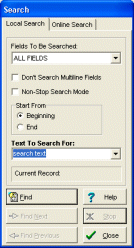
Invoice Software, search: The Local Search function helps you to locate records that contain the piece of data you are looking for. With this software, you are able to locate a piece of text in any field with the capability of moving to the next record filling your search criteria.
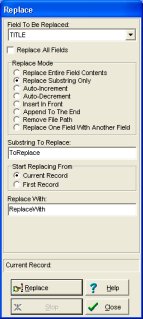
Invoice Software, replace: The Replace function helps you to replace the entire or the part of the field's content with a new value. This function is useful for users who want to make global changes on the selected field in the entire database.
Additional search features: incremental search, search online, find duplicates, non-stop search.
1. Invoice management solutions
2. Create, customize invoice solution
3. Search, replace invoice records
12. Summary, graph, statistics