PrimaSoft PC Software
Small Library Software for Windows.
Home Products Shop Support News Company
    Home > Small Library Organizer Pro > Software Tour
 
 Small Libray Organizer Pro
Overview
Buy Now
 
 Small Library Software Tour
1. Small Library management solutions
2. Library features
3. OPAC, Search, Replace
4. Print library reports
5. Print labels (spine labels, barcode labels, book cards,...)
6. Enter, modify data, auto cataloging
7. Table viewer
8. Browser viewer
9. Images, pictures
10. Sort Library records
11. Filter records
12. Summary, graph, statistics
13. Personalize, customize
14. Backup Library data
15. Network, multi-user, HTML wizard
16. Library Add-ons
17. Library Software FAQ


5/5 stars: "Outstanding in all respects. One of the best of its class."

"a great download for personal or business use"


Previous Page  ||  Next Page


10. Sort Library records

The program organizes and displays the data efficiently, so that the information is readily accessible in a variety of ways.

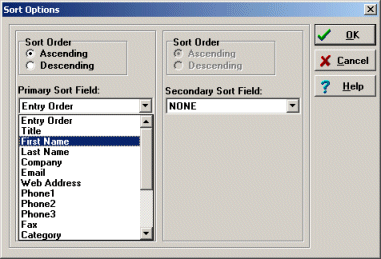
Sort your library records on any field, e.g. on title, author, loaned out, category, date, ...

library software sort


Buy Now
Go ahead. Try our product in your home or office for 30 days risk-free. If it doesn't meet or exceed every single one of your expectations, we insist you return it for a courteous, no questions-asked refund.
  • Secure Online Ordering, Mail, Fax, Phone: Online Store


    Try Now / Download
    Download free, fully functional trial version. The trial version will expire 45 days after installation. Click here to download Small Library Organizer Pro, software for Windows 95, 98, ME, 2000, NT, XP, Vista


    PrimaSoft Library Database Solutions for Windows:
    Music Library Database: simple music library database system.
    Movie Library Database: simple movie library database system.
    Check In/Out Organizer Pro: flexible check-in and check-out transaction management software that you can easily customize to your specifications.


  • Copyright © PrimaSoft PC, Inc. All rights reserved.