
PrimaSoft PC Software
Organize Your Financial Information.
Home Products Shop Support News Company
    Home > Money Organizer Deluxe > Software Tour
 
 Money Organizer Deluxe
Overview
Buy Now
 
 Money Software Tour
1. Money management solutions
2. Create Money database easily
3. Search, replace Money records
4. Print reports
5. Print labels
6. Enter, modify data
7. Table viewer
8. Browser viewer
9. Images, pictures
10. Sort Money records
11. Filter Money records
12. Summary, graph, statistics
13. Personalize, customize
14. Backup data
15. HTML wizard


 Links
Links


5/5 stars: "Outstanding in all respects. One of the best of its class." Software Awards

"a great download for personal or business use" Comments


Previous Page  ||  Next Page


3. Search, replace

The Local Search function helps you to locate Money records that contain the piece of data you are looking for. With this software, you are able to locate a piece of text in any field with the capability of moving to the next Money record filling your search criteria.
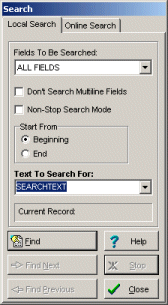
Money software search

The Replace function helps you to replace the entire or the part of the field's content with a new value. This function is useful for users who want to make global changes on the selected field in the entire database.
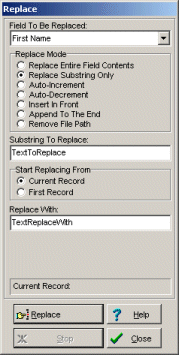
Money software replace

Additional search features: incremental search, search online, find duplicates, non-stop search.


Buy Now
Go ahead. Try our product in your home or office for 30 days risk-free. If it doesn't meet or exceed every single one of your expectations, we insist you return it for a courteous, no questions-asked refund.
  • Secure Online Ordering, Mail, Fax, Phone: Online Store


    Try Now / Download
    Download free, fully functional trial version. The trial version will expire 45 days after installation. Click here to download Money Organizer Deluxe (4.0MB), software for Windows 95, 98, ME, 2000, NT, XP, Vista


  • Copyright © PrimaSoft PC, Inc. All rights reserved.