|
Databases included in the package contain only minimum number of data fields. Those fields support the following functionality:
- track items by item name and item id (barcode) number
- track borrowers by name and id (barcode) number
- process check-in and check-out transactions (manually or with a barcode scanner);
- track due dates;
- bar code processing (optional);
- fine processing (optional);
- reservation processing (optional)
Our databases do not include fields that describe items and members of your facility. (Example: library software solution will contain different item and borrower data fields than laboratory, tool, or document tracking solutions). Those fields have to be added by you.
You can:
1. Use Check In/Out Organizer in the form provided.
2. We offer ready-to-use customized check-in and check-out solutions, you can download and try them:
Small Library Organizer Pro
Equipment/Tool Organizer Pro
Movie Library Organizer Pro
Music Library Organizer Pro
Software License Tracker Pro
Check In/Out Organizer Pro (loan/return items in large quantities)
3. You can modify Check In/Out Organizer Pro, please read below topics.
Our Check In-Out Organizer Pro consists of four databases: Borrowers database, Items database, Loans (check-in and check-out transactions) database, Fines database.
-
Borrowers database allows you to maintain information about users of your facility.
-
Items database allows you to maintain information about objects that will be rented (books, documents, videos, tools, inventory items..) and register check-out and check-in transaction.
-
Loans (Transactions) database is created automatically and this database keeps track of all activities in your facility.
-
Fines database automatically records fine related transactions: late return fine, fine payment.
Build you own check-in/check-out inventory software solution.
To build your check-in/check-out inventory system you need 4 databases with the minimum number of required data fields, additionally you add data fields that you need.
We already created a package with four databases and with the minimum number of required fields. If you are satisfied with the functionality of the software (Example: your can download and try Small Library Organizer Pro) but not with data fields included in our databases then:
-
Download Check In/Out Organizer Pro Software Package (Minimum).
-
Install Check In/Out Organizer Pro on your computer.
-
Start Designer, click Modify Database.
-
In the Select Database windows select Items and click OK.
-
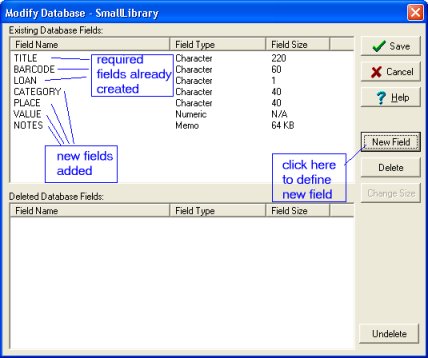
In the Modify Database window click New Field.
-
In the New Database Field enter field name, select field type, and enter field size.
Click OK. Repeat this procedure for all your fields.
-
Click Save to save all your changes.
-
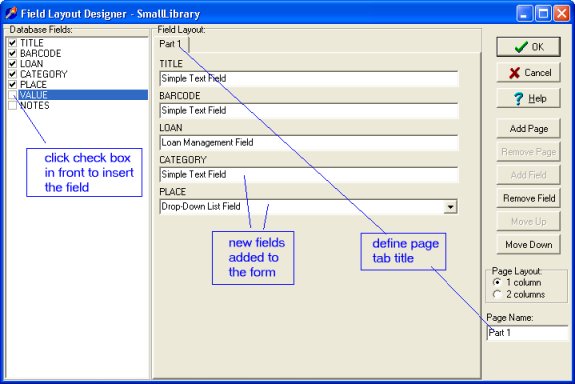
The Field Layout Designer is displayed with the list of old and new data fields.
-
Click check box in front of your fields to insert and define functionality of the field. Important: Do not click check boxes of the already listed fields (TITLE, BARCODE, LOAN). Repeat this procedure for all your fields.
-
Repeat 4 - 9 procedures for Borrowers database.
Example: Modify Database window with new data fields:
Example: Field Layout Designer window
Check In-Out Organizer Pro software package, databases
Items database structure:
TITLE, character, size: 220 (enter item title)
BARCODE, character, size: 60 (enter item bar code)
LOAN, character, size: 1 (specialized field)
add more data fields that you need.
Borrowers database structure:
NAME, character, size: 100 (enter person name)
ID_BARCODE, character, size: 60 (enter person bar code)
FINES, character, size: 1 (specialized field, displays items from the Fines database)
DUE, numeric (specialized field, automatically calculates total due amount)
add more data fields that you need.
Fines database structure:
NAME, character, size: 100 (person name)
DATE, date type (fine date)
AMOUNT, numerical (transaction amount)
WHAT, character, size: 10 (transaction type)
NOTE, character, size: 80 (transaction notes)
Check In-Out Tracking software makes automatic entries to this database.
Loan database structure:
Item, character, size: 220 (item title)
LoanedTo, character, size: 100 (person name)
LoanDate, date (loan date)
DueDate, date (due date)
ReturnDate, date (return date)
Notes, character, size: 80 (notes)
Check In-Out Tracking software makes automatic entries to this database.
How to define bar coding and fine processing functionality?
How to process check-out (loan transactions)?
How to process check-in (returns transactions)?
How to create bar code entries for existing records?
How to print bar code labels (item labels, borrower id cards)?
|