
Organizer Advantage is powerful yet easy to use database manager for Windows.
Advantage Designer lets you modify our solutions or easily create new databases.
Take control of your data with our simple or buinsess database software solutions.
| Organizer Advantage HowTo/Help | Designer HowTo/Help |
Advantage Help > Options > How To > How to send email from the program?
easy-to-use database manager and database designer for Windows
How to Send an Email Directly from Organizer Advantage
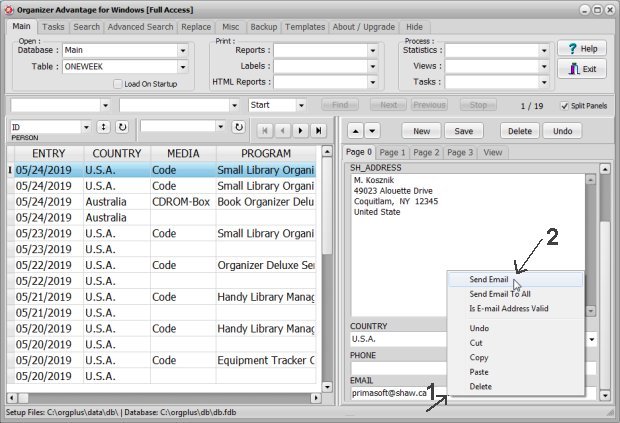
This section describes how to send an email directly from within the application. To do this, right-click on an email field in a record to open the popup menu, then select the option to send a message to that specific address or to all email addresses currently displayed in the table.
Organizer Advantage lets you send email messages. Right clicking on the email field box (1) displays the popup menu with the email command (2). You can send the message to the selected email address or to all in the opened table.
Copyright © 2026 · All Rights Reserved · PrimaSoft PC