
Organizer Advantage is powerful yet easy to use database manager for Windows.
Advantage Designer lets you modify our solutions or easily create new databases.
Take control of your data with our simple or buinsess database software solutions.
| Organizer Advantage HowTo/Help | Designer HowTo/Help |
Advantage Help > Backup, Restore > How To > How to restore a custom solution into the Main database?
easy-to-use database manager and database designer for Windows
How to Restore a Custom Solution into the Main Database
When PrimaSoft delivers a custom database solution by email, it arrives as two files - an FDB (data) and a ZIP (setup configuration). This page walks through saving both files to the backup folder, then running Restore Data Folder followed by Restore Database in the correct order to activate the solution.
- We send custom solutions by email as attachment.
- There are two files. They represent data tables (fdb file) and setup configurations (zip file).
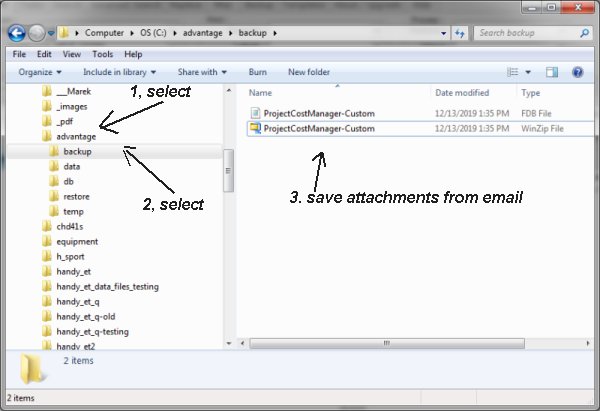
- Save two files in the Organizer Advantage backup folder.
- Start Organizer Advantage.
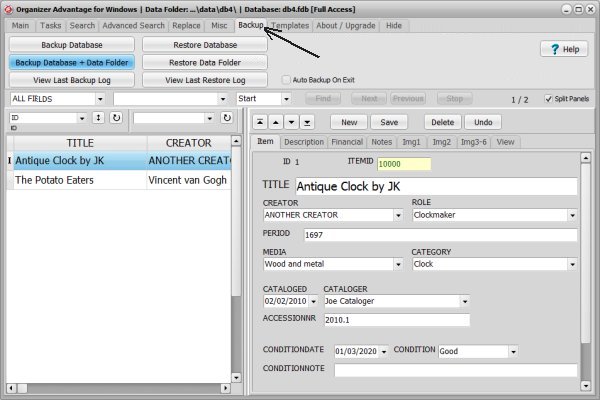
- On the Backup tab click “Restore Data Folder”. Select the zip file.
- On the Backup tab click “Restore Database”. Select the fdb file.
- Important: steps 5 and 6 should be executed in this order.
Save two files in the Organizer Advantage backup folder.
Run “Restore Data Folder” (zip file) then run “Restore Database” (fdb file).
Copyright © 2026 · All Rights Reserved · PrimaSoft PC