
Organizer Advantage is powerful yet easy to use database manager for Windows.
Advantage Designer lets you modify our solutions or easily create new databases.
Take control of your data with our simple or buinsess database software solutions.
| Organizer Advantage HowTo/Help | Designer HowTo/Help |
Advantage Help > Backup, Restore > How To > How to save files from the transfer set?
easy-to-use database manager and database designer for Windows
How to Save Files from a Dropbox Transfer Set to the Backup Folder
PrimaSoft uses Dropbox Transfer to deliver custom solution files. This page explains how to save the FDB and ZIP files directly to the Organizer Advantage backup folder rather than the browser's default Downloads folder — and what to do if your browser forces the download there instead.
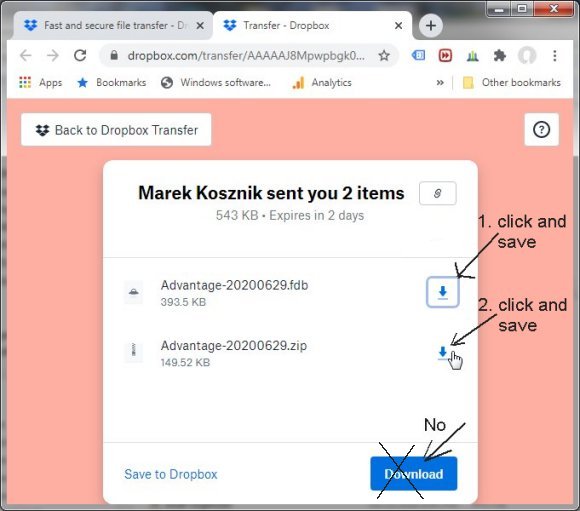
- We use Dropbox Transfer service to send files over the web.
- Usually we send two files. They represent data tables (fdb file) and setup configurations (zip file).
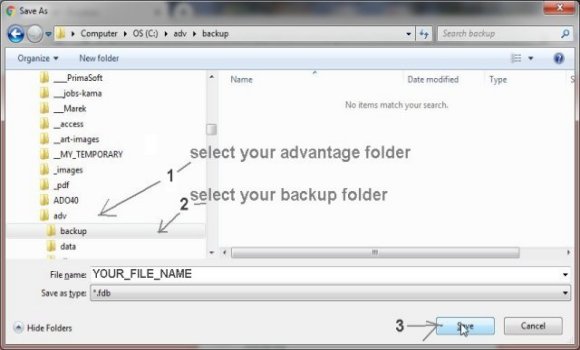
- Save two files in the Organizer Advantage backup folder. (C:/your_advantage/backup)
- Important: when you save files on your computer don't use Download button.
Save two files(one by one) in the Organizer Advantage backup folder (1,2):
Select your backup folder.
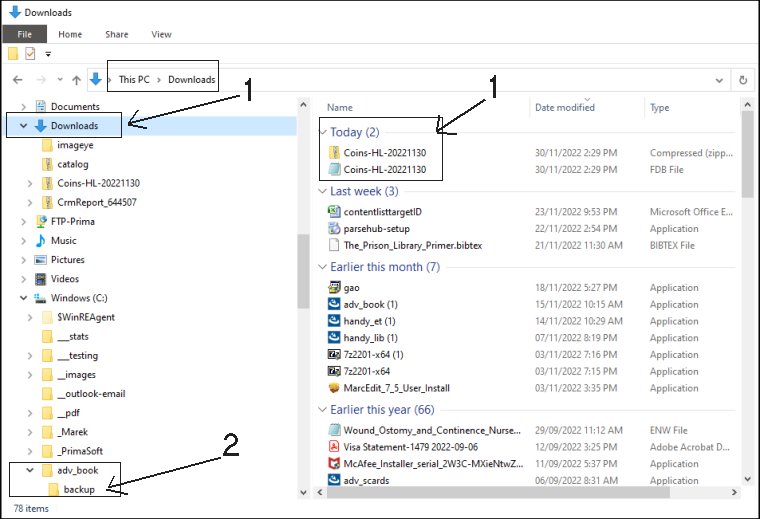
Important: Some browsers do not allow to select the "save to folder"; the downloaded files are saved in the "Downloads" folder (1). In this case, you will have to copy the downloaded files to the backup folder (2).
Open Windows File Explorer and copy two files to the backup subfolder.
How to restore a custom solution into the Main database?
Copyright © 2026 · All Rights Reserved · PrimaSoft PC