
Organizer Advantage is powerful yet easy to use database manager for Windows.
Advantage Designer lets you modify our solutions or easily create new databases.
Take control of your data with our simple or buinsess database software solutions.
| Organizer Advantage HowTo/Help | Designer HowTo/Help |
Advantage Help > Solutions > GDPR Erasure Ledger User Guide
- Organizer Advantage
- Getting Started Videos
- Main Window
- Tabbed Toolbars
- Add Data
- No Limits
- Reports
- Labels
- Search, Replace
- HTML Reports
- HTML Wizard
- Import, Export
- Free Data Setup
- Backup, Restore
- Options
- Statistics, Views
- Solutions
- Solutions
- Museum Suite
> GDPR Erasure Ledger
- Templates
- Add-Ons
- Install, Network
- Web Search, Add Data
- Premium
- Upgrade, Update
- Organizer Deluxe, Pro Users
- More
GDPR Erasure Ledger
The GDPR Erasure Ledger solution is a specialized framework and app for Windows PCs designed to manage your data privacy compliance with ease. It provides a simple, easy-to-use software built for small businesses, online shops, and growing organizations that need to track customer deletion requests securely. Monitor your high-stakes regulatory timelines on your Windows desktop with a professional interface built for speed and accuracy.
| Topic | Description |
|---|---|
| Purpose | Provides a standardized framework for documenting, tracking, and managing customer data erasure requests to ensure full legal privacy compliance. |
| Data Structure | The solution is organized into three core windows: Requests, Locations, and Cleanups tracking. |
| Key Privacy Fields | Includes specialized tracking for DAYS_LEFT countdowns, identity VERIFIED records, and RETENTION rules for conflicting laws. |
| Our Services | We provide expert services for custom solutions and seamless data transfer from your existing spreadsheets into the Ledger environment. |
| Download | If the solution is not yet installed, please visit our download page to retrieve and set up your software. |
Review the entry/view pages and descriptions of data fields and samples below, and you are ready to manage your heritage items.
Requests Table
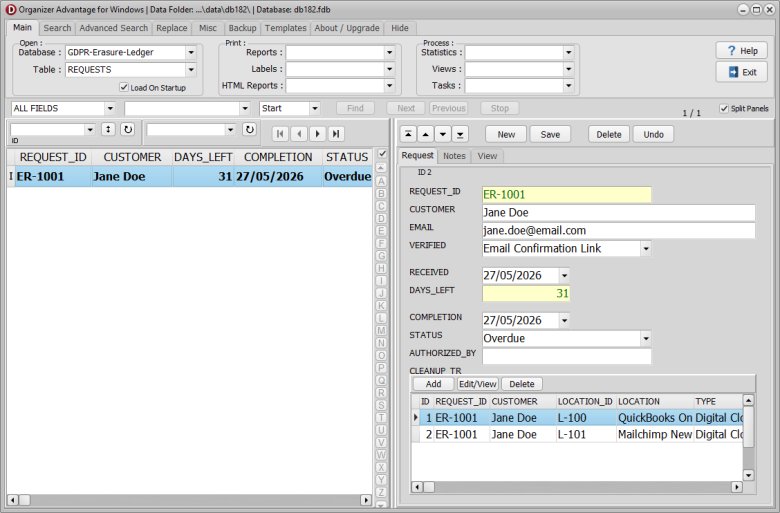
Tracks incoming customer data deletion requests and legal deadlines.
| Field Name | Explanation | Data Entry Sample |
|---|---|---|
| ID | Unique system-generated identifier for the record. | 101 |
| REQUEST_ID | Unique tracking number assigned to the data deletion request. | REQ-2026-0892 |
| CUSTOMER | The full name of the individual asking for data removal. | Alice Smith |
| The email address of the person making the request. | alice.smith@email.com | |
| VERIFIED | The method used to check the identity of the customer. | ID Copy Upload |
| RECEIVED | The date the organization received the erasure request. | 2026-05-15 |
| DAYS_LEFT | The number of calendar days remaining before the legal compliance deadline. | 18 |
| COMPLETION | The date when all data was fully and successfully erased. | 2026-05-20 |
| STATUS | The current stage of the deletion process. | In Progress |
| AUTHORIZED_BY | The compliance officer or manager who approved the request action. | John Doe |
| USER_1 | Custom tracking field for additional company-specific user data. | North Region Office |
| USER_2 | Custom tracking field for extra department or staff details. | VIP Account Tier |
| NOTES | Detailed comments regarding the request or specific handling instructions. | Customer called to confirm tax records must be kept. |
| CLEANUP_TR | Internal connection linking the request to its individual system cleanup steps. | [MasterDetail Link] |
Locations Table
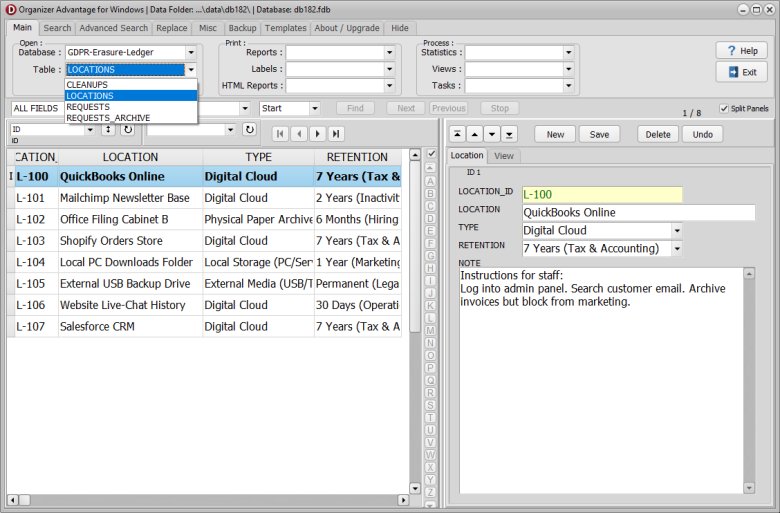
Lists the digital systems and physical places where customer data is stored.
| Field Name | Explanation | Data Entry Sample |
|---|---|---|
| ID | Unique system-generated identifier for the record. | 10 |
| LOCATION_ID | Unique system code assigned to a specific data storage place. | LOC-04 |
| LOCATION | The name of the digital system or physical place holding the data. | Salesforce CRM |
| TYPE | The classification of the storage area. | Cloud Database |
| RETENTION | The legal rule or timeline for keeping specific data types. | 7 Years Tax Law |
| NOTE | Extra notes about the storage location or its special rules. | Cabinet requires key card access from HR. |
Cleanups Table
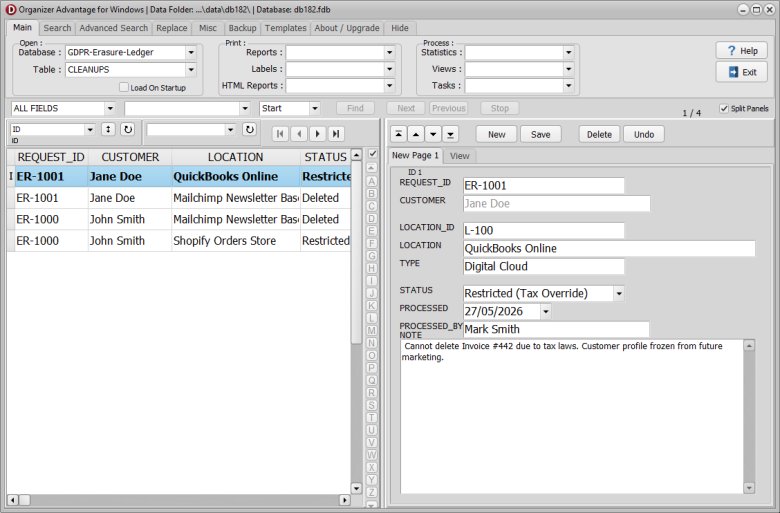
Logs individual cleaning actions taken for each storage location per request.
| Field Name | Explanation | Data Entry Sample |
|---|---|---|
| ID | Unique system-generated identifier for the record. | 502 |
| REQUEST_ID | The matching tracking number from the main deletion request. | REQ-2026-0892 |
| CUSTOMER | The full name of the individual asking for data removal. | Alice Smith |
| LOCATION_ID | The matching code for where the data is stored. | LOC-04 |
| LOCATION | The name of the system or place being cleaned. | Salesforce CRM |
| TYPE | The classification of the storage area. | Cloud Database |
| STATUS | The current cleanup progress for this specific location. | Completed |
| PROCESSED | The exact date the data was wiped from this location. | 2026-05-19 |
| PROCESSED_BY | The staff member who deleted the files from the location. | Jane Miller |
| NOTE | Extra notes about this specific cleanup step. | Backup files took 24 hours to clear. |
Requests Archive Table
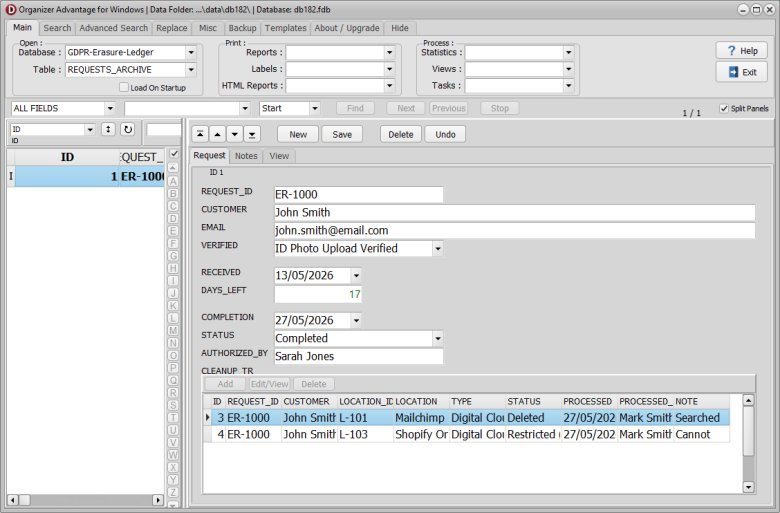
Stores completed data deletion requests moved from the main Requests table for historical compliance records. This table uses the exact same structure as the Requests table.
| Field Name | Explanation | Data Entry Sample |
|---|---|---|
| Note: This table mirrors the structure of the Requests Table exactly. | ||
| ID | Unique system-generated identifier for the record. | 101 |
| REQUEST_ID | Unique tracking number assigned to the data deletion request. | REQ-2026-0892 |
| CUSTOMER | The full name of the individual asking for data removal. | Alice Smith |
| The email address of the person making the request. | alice.smith@email.com | |
| VERIFIED | The method used to check the identity of the customer. | ID Copy Upload |
| RECEIVED | The date the organization received the erasure request. | 2026-05-15 |
| DAYS_LEFT | The number of calendar days remaining before the legal compliance deadline. | 18 |
| COMPLETION | The date when all data was fully and successfully erased. | 2026-05-20 |
| STATUS | The current stage of the deletion process. | In Progress |
| AUTHORIZED_BY | The compliance officer or manager who approved the request action. | John Doe |
| USER_1 | Custom tracking field for additional company-specific user data. | North Region Office |
| USER_2 | Custom tracking field for extra department or staff details. | VIP Account Tier |
| NOTES | Detailed comments regarding the request or specific handling instructions. | Customer called to confirm tax records must be kept. |
| CLEANUP_TR | Internal connection linking the request to its individual system cleanup steps. | [MasterDetail Link] |
How to Create a GDPR Data Erasure Compliance Report
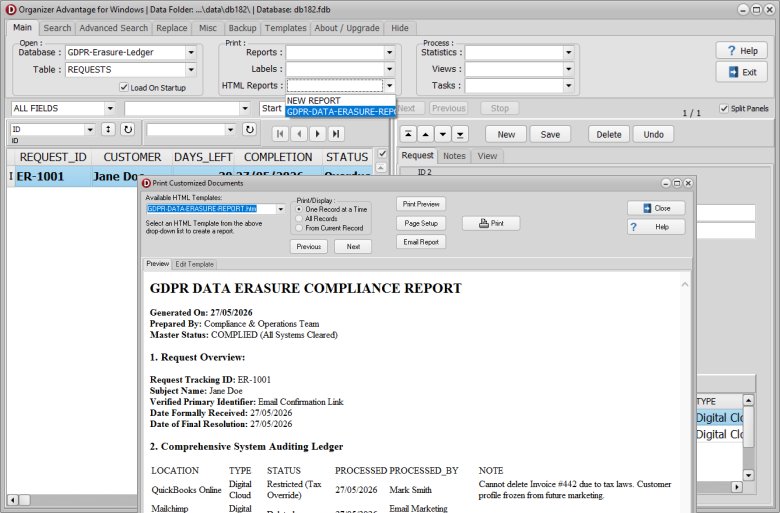
Follow these quick steps to generate your compliance report once a deletion request is finished:
- Check Completion: Start the reporting process only after a data deletion request has been fully completed.
- Select the Record: Find and click on the specific completed request row in your main window.
- Choose the Report Layout: Go to the main tab, click the HTML Reports drop-down menu, and select GDPR-DATA-ERASURE-REPORT.htm to view the preview.
- Save or Print: Review the displayed information on your screen, then print the page out or save it as a PDF file.
How to Move and Archive Completed Records
Follow these quick steps to safely move a finished request to your archive:
- Select the Record: Find and select the completed request row in your main Requests window.
- Create the Report: Once a data deletion request is finished, make a GDPR Data Erasure Compliance Report. Print the file out or save it directly as a PDF.
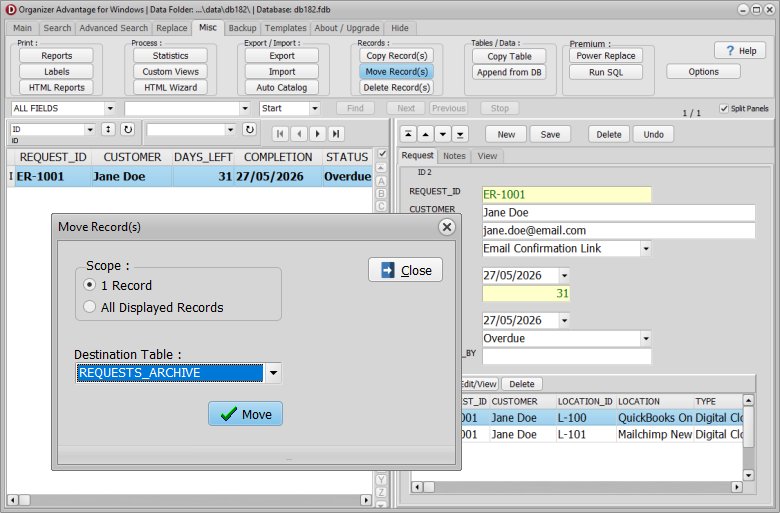
- Click Move: Open the Misc. tab on your interface and click the MOVE button.
- Select the Destination: Choose Requests_Archive as your destination table and finish the transfer. The system will now safely move the record.
Cleanup Transaction (CLEANUP_TR) Field Functionality
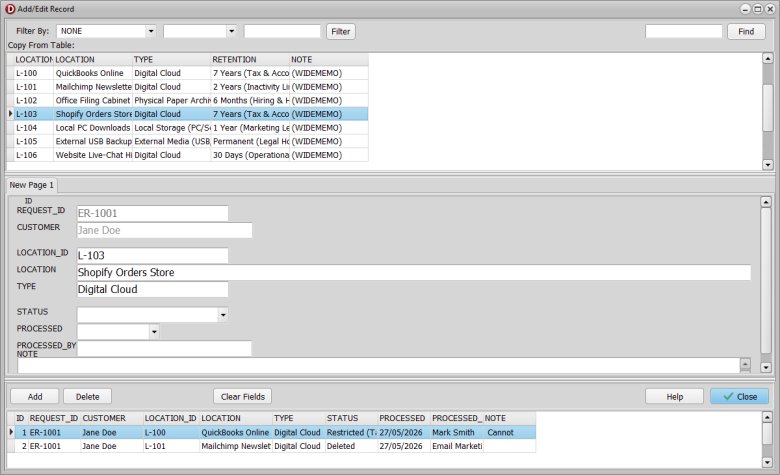
The CLEANUP_TR field is a master-detail component that manages individual system audit logs for a customer's data erasure request. Users interact with this field using three action buttons: Add to create a new system location record; Edit/View to inspect or modify an existing transaction; and Delete to remove a cleanup record permanently.
When managing these entries, the Cleanup Transaction window is split into three functional sections:
- Top Section: Displays a selection list of all available cleanup locations pulled directly from the LOCATIONS table.
- Middle Section: Shows the detailed fields, verification status, and destruction notes for the currently selected transaction.
- Bottom Section: Displays a running historical list of all completed and pending cleanup transactions linked to that specific customer.
Copyright © 2026 · All Rights Reserved · PrimaSoft PC