
Organizer Advantage is powerful yet easy to use database manager for Windows.
Advantage Designer lets you modify our solutions or easily create new databases.
Take control of your data with our simple or buinsess database software solutions.
| Organizer Advantage HowTo/Help | Designer HowTo/Help |
Advantage Help > Auto-Cataloging, Web Search
- Organizer Advantage
- Getting Started Videos
- Main Window
- Tabbed Toolbars
- Add Data
- No Limits
- Reports
- Labels
- Search, Replace
- HTML Reports
- HTML Wizard
- Import, Export
- Free Data Setup
- Backup, Restore
- Options
- Statistics, Views
- Solutions
- Templates
- Add-Ons
- Install, Network
- Web Search, Add Data
- Auto-Catalog by ISBN
- Define Mapping
- Title, Author Search
- Scripts, Update - Premium
- Upgrade, Update
- Organizer Deluxe, Pro Users
- More
Web Search & Auto-Cataloging: Add Records from the Internet
This section provides an overview of the Auto-Catalog feature, which allows you to automatically create database records by searching online sources. For example, you can add books using their ISBN from the Library of Congress or movies by their UPC codes. Please note that a yearly support subscription is required to access this feature; however, an evaluation mode is available that supports up to 100 entries. Additionally, there are links to step-by-step guides for conducting ISBN searches, mapping fields, searching by title or author, and updating scripts.
Customers who purchase yearly support have access to an auto-cataloging feature. The evaluation version lets you test the feature and supports 100 entries.
Web auto-search and auto-cataloging allows you to create entries automatically from the Internet. For example you can search books by ISBN number, movies by UPC code.
There are some sites that support a set of functions (free API tools) allowing the creation of the web search and automatic retrieval of data. For example, in our Book Organizer Advantage solution, the program can add book information based on a book’s ISBN number, data is retrieved from the Library of Congress search engine.
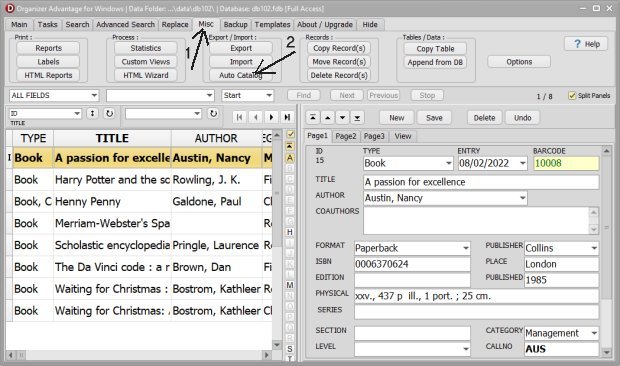
The Auto-Catalog feature is listed if the program installs with the scripts folder. The script folder includes the set of files that support the web search and the auto-cataloging procedures.
If your organization provides similar web search interface (API), maybe we can help you with the creation of the script files. Please contact us.
On the Miscellaneous toolbar click Auto Catalog.
Copyright © 2026 · All Rights Reserved · PrimaSoft PC