
Organizer Advantage is powerful yet easy to use database manager for Windows.
Advantage Designer lets you modify our solutions or easily create new databases.
Take control of your data with our simple or buinsess database software solutions.
| Organizer Advantage HowTo/Help | Designer HowTo/Help |
Advantage Help > Main Window
- Organizer Advantage
- Getting Started Videos
- Main Window
- Tabbed Toolbars
- Quick Search
- Grid
- Grid, Sort Data
- Grid, Filter/Search
- Record Form
- Letter Tabs
- How To .. - Tabbed Toolbars
- Add Data
- No Limits
- Reports
- Labels
- Search, Replace
- HTML Reports
- HTML Wizard
- Import, Export
- Free Data Setup
- Backup, Restore
- Options
- Statistics, Views
- Solutions
- Templates
- Add-Ons
- Install, Network
- Web Search, Add Data
- Premium
- Upgrade, Update
- Organizer Deluxe, Pro Users
- More
Organizer Advantage for Windows – Main Window Overview
The Main Window in Organizer Advantage for Windows is the central area where you work with your database records. It provides access to the main tools for viewing, searching, sorting, and managing data.
This page explains the key parts of the Main Window interface. Refer to the numbered image below to understand each feature and how it is used in everyday work.
The tabbed toolbars (1) contain grouped functions. The quick search bar (2) gives you convenient access to the search. The grid (3) lists several records. The form (4) displays the detailed information about a selected record. The main window is resizable, and you can also change the widths of both left and right pages (the grid and the form widths).
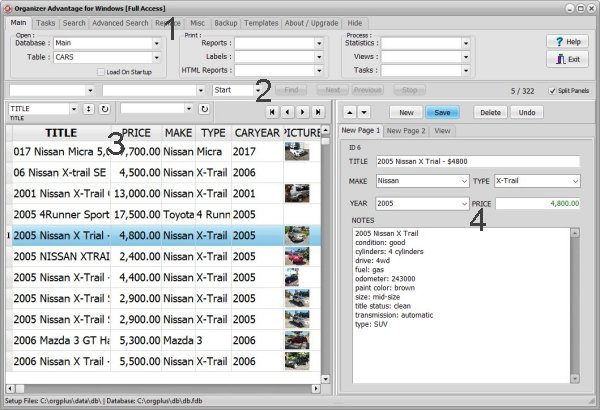
The Main Window in Organizer Advantage for Windows is the central workspace where you view, search, sort, and manage your database records.
This section explains the main interface components, including toolbars, data grid, record forms, filters, and navigation tools.
Use these guides to learn how to efficiently browse records, customize views, apply filters, and work with your data more effectively.
Split Panels Option (On/Off)
Set the split panels ON, in this configuration the grid is displayed on the left side and the form is displayed on the right side.
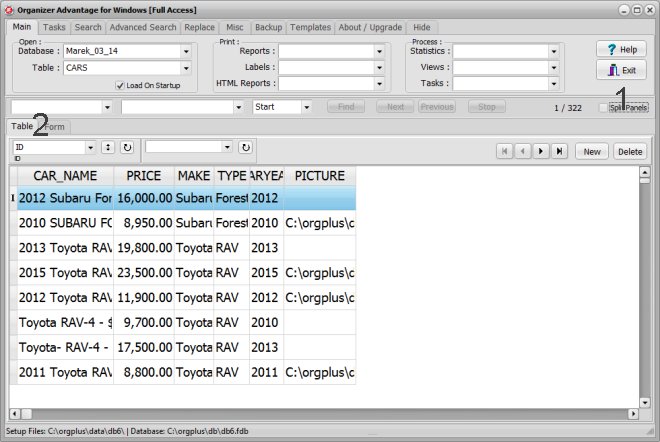
With the split panels OFF (1) the grid and the form are displayed in separate tab panels (2).
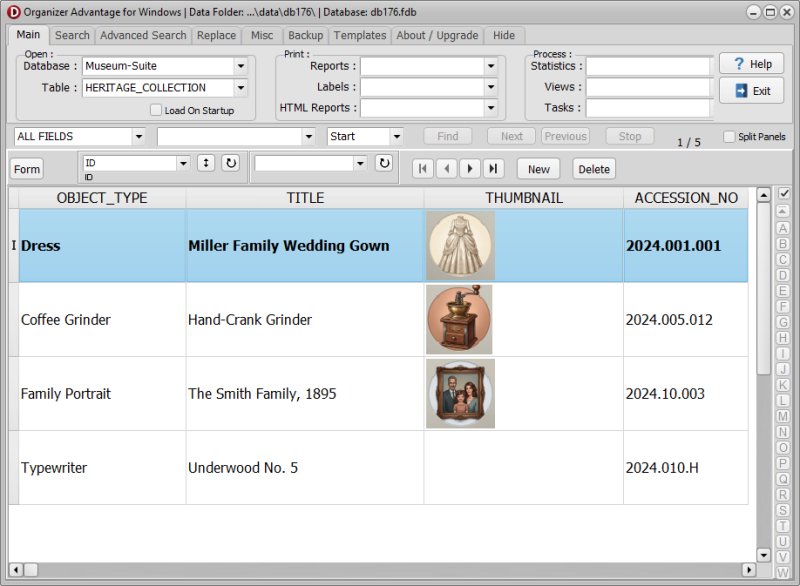
The "Grid" View (Heritage Solution)
This image shows the user interface with the Grid tab active. The data form is entirely hidden, allowing the data rows to occupy the main space. Click the Form button to display the form, or double-click the row.
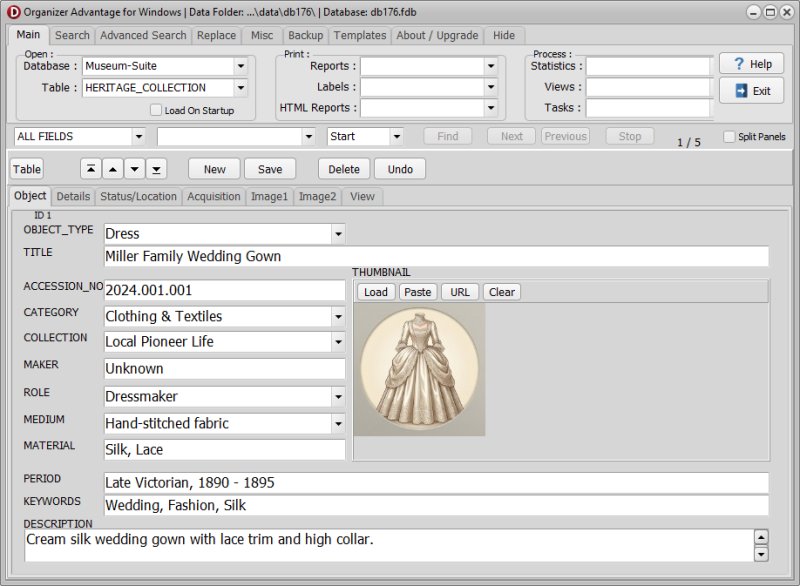
The "Form" View (Heritage Solution)
This image shows the user interface when the Form tab is selected. The spreadsheet-like grid disappears, and the focus changes to a detailed layout for a single record. Click the Table button to display the grid.
Copyright © 2026 · All Rights Reserved · PrimaSoft PC