
Organizer Advantage is powerful yet easy to use database manager for Windows.
Advantage Designer lets you modify our solutions or easily create new databases.
Take control of your data with our simple or buinsess database software solutions.
| Organizer Advantage HowTo/Help | Designer HowTo/Help |
Advantage Help > Search, Replace > Search
- Organizer Advantage
- Getting Started Videos
- Main Window
- Tabbed Toolbars
- Add Data
- No Limits
- Reports
- Labels
- Search, Replace
- Quick Search
> Search
- Advanced Search
- Search, Replace
- How To .. - HTML Reports
- HTML Wizard
- Import, Export
- Free Data Setup
- Backup, Restore
- Options
- Statistics, Views
- Solutions
- Templates
- Add-Ons
- Install, Network
- Web Search, Add Data
- Premium
- Upgrade, Update
- Organizer Deluxe, Pro Users
- More
Search: Find Records Using Flexible Text Conditions
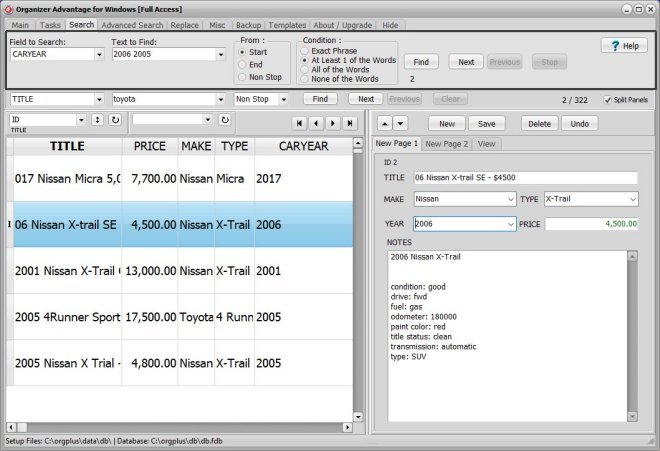
The Regular Search tool, found in the Search toolbar section, lets you locate records in any field using four ready-to-use conditions: exact phrase, at least one word, all words, or none of the words. Use the Next button to step through matching records, or enable Non-Stop mode to display only those records that meet your criteria.
Search Conditions:
Exact Phrase: the entire phrase (Text To Find) must exist in the selected data field;
At Least 1 of the Words: at least 1 of the words (Text To Find) must exist in the selected data field;
All of the Words: all of the words (Text To Find) must exist in one data field but not necessarily in the same order;
None of the Words: none of the words (Text To Find) must exist in one data field;
The Search function positions you in the first record that matches your search criteria. Use the Next button to go to the next record that contains the text searched for.
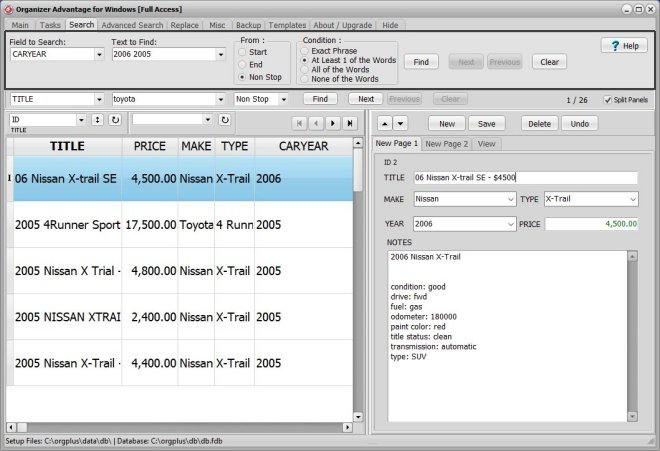
What is the result of a search when the "Non-Stop Search Mode" option is marked?
The program goes through the entire database looking for records that match the search criteria. When the search is finished ONLY those records are displayed that contain the text. In order to return to All-Records-Display click the Clear button.
Copyright © 2026 · All Rights Reserved · PrimaSoft PC