
Organizer Advantage is powerful yet easy to use database manager for Windows.
Advantage Designer lets you modify our solutions or easily create new databases.
Take control of your data with our simple or buinsess database software solutions.
| Organizer Advantage HowTo/Help | Designer HowTo/Help |
Advantage Help > Solutions > Museum Suite > How to use the Built-in Help System
easy-to-use database manager and database designer for Windows
- Organizer Advantage
- Getting Started Videos
- Main Window
- Tabbed Toolbars
- Add Data
- No Limits
- Reports
- Labels
- Search, Replace
- HTML Reports
- HTML Wizard
- Import, Export
- Free Data Setup
- Backup, Restore
- Options
- Statistics, Views
- Solutions
- Solutions
> Museum Suite
- Heritage Collection
- Military Museum
- Art Tracker
- Fine Art Gallery
> Built-in Help
- GDPR Erasure Ledger
- Templates
- Add-Ons
- Install, Network
- Web Search, Add Data
- Premium
- Upgrade, Update
- Organizer Deluxe, Pro Users
- More
How to use the Built-in Help System
The software includes a searchable help table designed for quick access to feature explanations. Follow these steps to find the information you need:
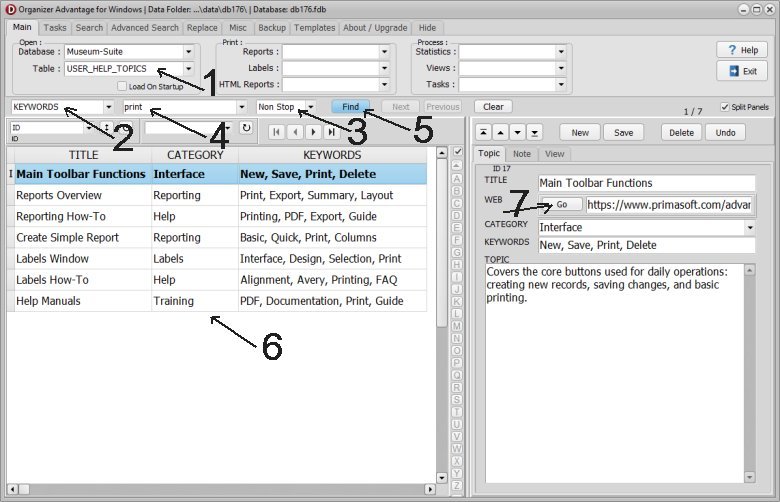
- Click the TABLE dropdown menu and select USER_HELP_TOPICS (1).
- Click the ALL FIELDS dropdown and select KEYWORDS (2).
- Set the search mode to Start and select NonStop (3).
- Enter your search term (4) (e.g., "Print") into the search box and click Find (5).
- Review the matching topics (6), titles, and short descriptions in the list.
- Click the WEB (7) link to view the detailed explanation with images on our website.
Copyright © 2026 · All Rights Reserved · PrimaSoft PC