
Organizer Advantage is powerful yet easy to use database manager for Windows.
Advantage Designer lets you modify our solutions or easily create new databases.
Take control of your data with our simple or buinsess database software solutions.
| Organizer Advantage HowTo/Help | Designer HowTo/Help |
Advantage Help > Solutions > Museum Suite > Fine Art Gallery
easy-to-use database manager and database designer for Windows
- Organizer Advantage
- Getting Started Videos
- Main Window
- Tabbed Toolbars
- Add Data
- No Limits
- Reports
- Labels
- Search, Replace
- HTML Reports
- HTML Wizard
- Import, Export
- Free Data Setup
- Backup, Restore
- Options
- Statistics, Views
- Solutions
- Solutions
> Museum Suite
- Heritage Collection
- Military Museum
- Art Tracker
> Fine Art Gallery
- Built-in Help
- GDPR Erasure Ledger
- Templates
- Add-Ons
- Install, Network
- Web Search, Add Data
- Premium
- Upgrade, Update
- Organizer Deluxe, Pro Users
- More
Fine Art Gallery
The Fine Art Gallery solution is a specialized framework and app for Windows PCs. It is specifically designed to be simple to use and ideal for small galleries run by users who may not have extensive experience in PC operations or professional art management. The interface is intuitive, ensuring that volunteers and local curators can easily document and protect their art collections without a steep learning curve.
| Topic | Description |
|---|---|
| Purpose | Provides a standardized framework for documenting, tracking, and valuing fine art assets, including paintings, sculptures, and mixed media. |
| Data Structure | The solution is organized into five core windows: Object, Details, Status/Location, Acquisition, and Image documentation. |
| Key Gallery Fields | Includes specialized tracking for Artist, Medium, and Edition to maintain precise cataloging standards for the art market. |
| Our Services | We provide expert services for custom solutions and seamless data transfer from your existing spreadsheets into the Museum Suite environment. |
| Download | If the solution is not yet installed, please visit our download page to retrieve and set up your software. |
Review the entry/view pages and descriptions of data fields and samples below, and you are ready to manage your fine art collections.
1. Quick Start: Open Fine Art Gallery.
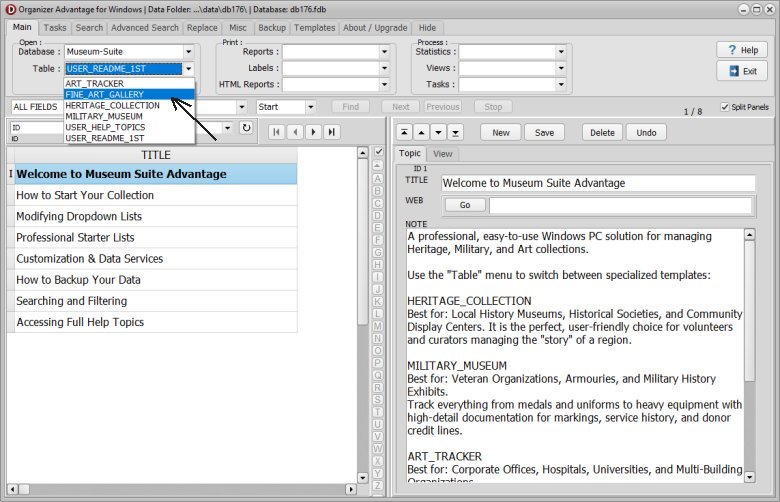
After installing the Museum Suite Advantage, click the TABLE dropdown in the software and select FINE_ART_GALLERY to load.
2. Object Page : Primary identification and classification of the item.
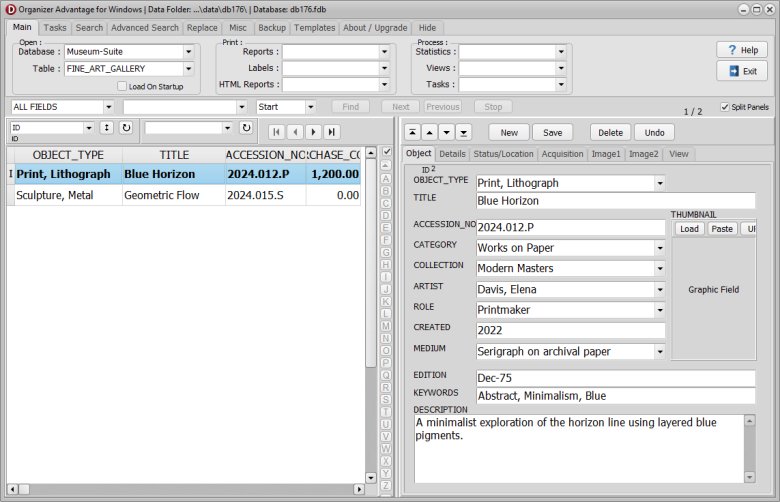
| Field Name | Explanation | Data Entry Sample |
|---|---|---|
| ID | Unique system-generated identifier for the record. | 50012 |
| OBJECT_TYPE | The general classification of the artwork. | Painting |
| TITLE | The formal name of the artwork. | Midnight Reflections |
| ACCESSION_NO | The unique number assigned upon formal acquisition. | 2026.08.12 |
| CATEGORY | The thematic department or art movement. | Abstract Expressionism |
| COLLECTION | The specific sub-collection or gallery grouping. | Modern Masters |
| ARTIST | The primary creator of the work. | Julian Vance |
| ROLE | The specific role of the creator (e.g., Painter, Sculptor). | Painter |
| CREATED | The date or year the work was completed. | 2023 |
| MEDIUM | The primary substance used (e.g., Acrylic on Canvas). | Acrylic |
| EDITION | The number of the print or cast (if applicable). | N/A (Original) |
| KEYWORDS | Searchable tags for quick filtering and indexing. | Blue, Texture, Large Scale, Urban |
| DESCRIPTION | A detailed physical summary of the artwork's appearance. | Large-scale blue abstract with heavy texture and gold leaf accents. |
| THUMBNAIL | A small reference image file for quick identification. | midnight_thumb.jpg |
3. Details Page: Specific physical attributes and custom user data.
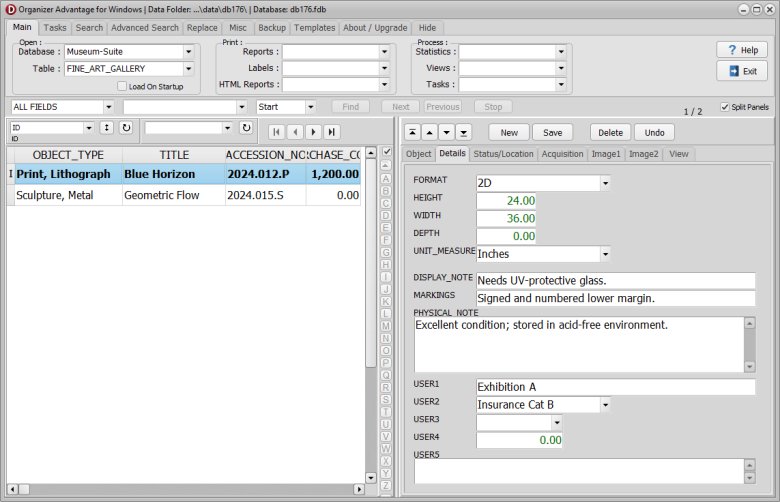
| Field Name | Explanation | Data Entry Sample |
|---|---|---|
| FORMAT | The shape or orientation of the work (e.g., Vertical). | Portrait |
| HEIGHT | The vertical measurement of the work. | 120 |
| WIDTH | The horizontal measurement of the work. | 100 |
| DEPTH | The thickness of the work (if applicable). | 4 |
| UNIT_MEASURE | The system of measurement used (cm or in). | cm |
| DISPLAY_NOTE | Special instructions for hanging or exhibiting the piece. | Requires spot lighting; handle with gloves. |
| MARKINGS | Signatures, dates, or stamps found on the work. | Signed and dated "Vance '23" on verso. |
| PHYSICAL_NOTE | General observations regarding materials or frame. | Floating black wood frame. |
| USER1 - USER5 | Custom fields for internal gallery tracking. | [Insurance Tier 1] |
4. Status/Location Page: Current whereabouts and physical state of the object.
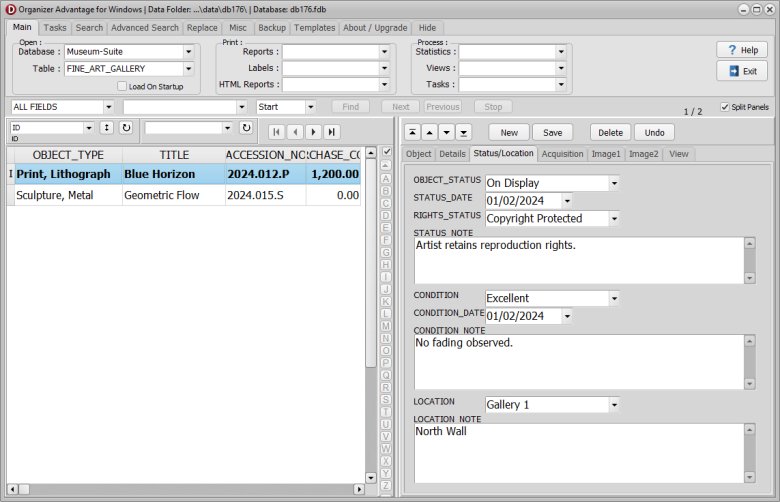
| Field Name | Explanation | Data Entry Sample |
|---|---|---|
| OBJECT_STATUS | The current state (On Display, In Storage, On Loan). | On Display |
| STATUS_DATE | The date the current status was officially recorded. | 2026-09-01 |
| RIGHTS_STATUS | The legal ownership or copyright status. | Artist Retains Rights |
| STATUS_NOTE | Additional information regarding the current status. | Featured in the 'City Light' exhibition. |
| CONDITION | The overall physical health of the artwork. | Excellent |
| CONDITION_DATE | The date of the last formal condition assessment. | 2026-08-15 |
| CONDITION_NOTE | Specific details regarding wear, damage, or repairs. | Surface is clean; no pigment loss. |
| LOCATION | The physical room, case, or shelf where the item is kept. | Main Hall, Wall A |
| LOCATION_NOTE | Specific directions for finding the item. | Mounted 1.5m from floor. |
5. Acquisition Page: Information regarding how the object entered the collection.
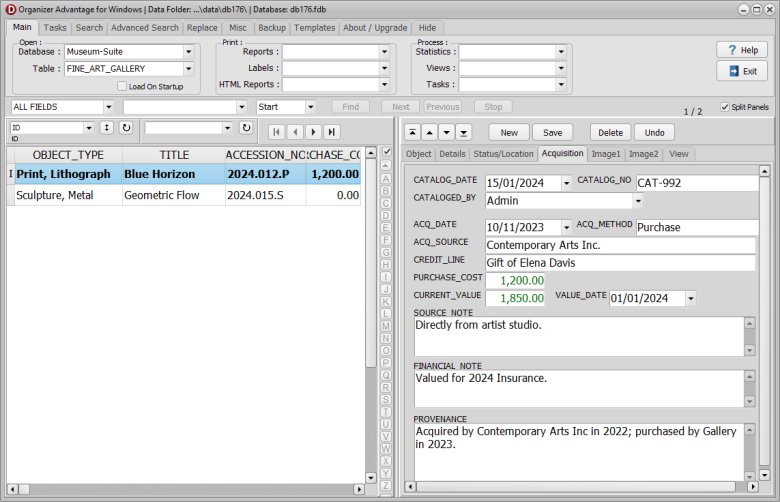
| Field Name | Explanation | Data Entry Sample |
|---|---|---|
| CATALOG_DATE | The date the item was formally recorded in the system. | 2026-08-20 |
| CATALOG_NO | An internal tracking number for the cataloging process. | FA-992 |
| CATALOGED_BY | The name of the staff member who entered the data. | Emma Wright |
| ACQ_DATE | The date the gallery physically received the item. | 2026-08-12 |
| ACQ_METHOD | How the item was obtained (Purchase, Consignment). | Purchase |
| ACQ_SOURCE | The person or gallery the item came from. | Vance Studio |
| CREDIT_LINE | Official text used for public acknowledgment. | Purchased through the Gallery Fund. |
| PURCHASE_COST | The original price paid for the work. | 8500.00 |
| CURRENT_VALUE | The most recent appraised market value. | 9200.00 |
| VALUE_DATE | The date of the most recent valuation. | 2026-10-01 |
| SOURCE_NOTE | Private contact info or background on the source. | Artist direct; primary market. |
| FINANCIAL_NOTE | Notes on taxes, insurance, or commission. | Premium coverage; 10% commission paid. |
| PROVENANCE | The documented history of the item's previous ownership. | Artist studio to Fine Art Gallery (2026). |
6. Image Page: Management of high-resolution visual records.
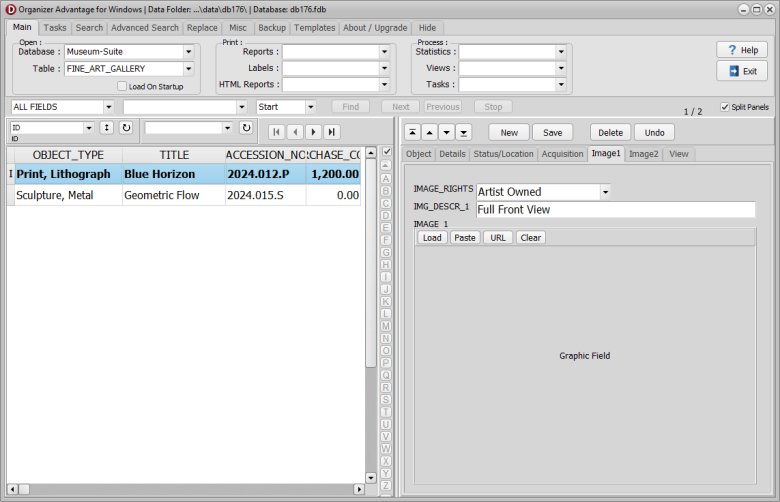
| Field Name | Explanation | Data Entry Sample |
|---|---|---|
| IMAGE_RIGHTS | Usage permissions and restrictions for the image file. | Press/Marketing Only |
| IMG_DESCR_1 | A brief description of the primary image. | Full view without frame |
| IMAGE_1 | The high-resolution file path for the image. | midnight_refl_primary.tif |
Fine Art Gallery: Authority and Pick Lists.
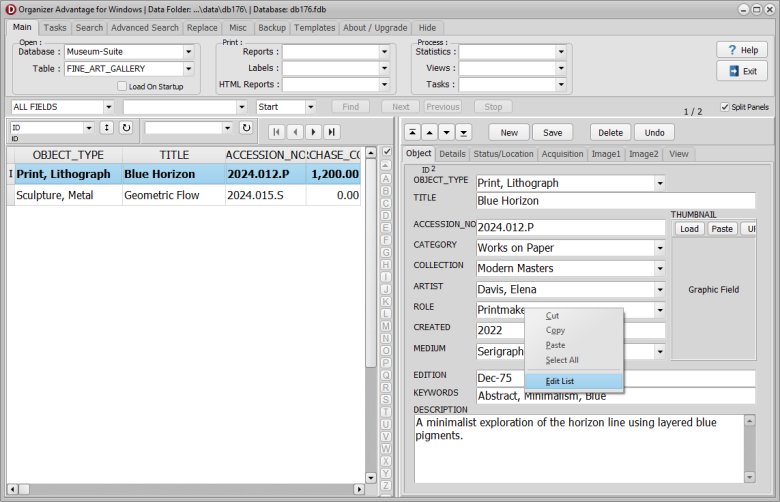
- Software comes with predefined authority and pick lists.
- You can modify them.
- Right mouse click on the box, select Edit List.
- Read this help topic to find more.
Fine Art Gallery: Images.
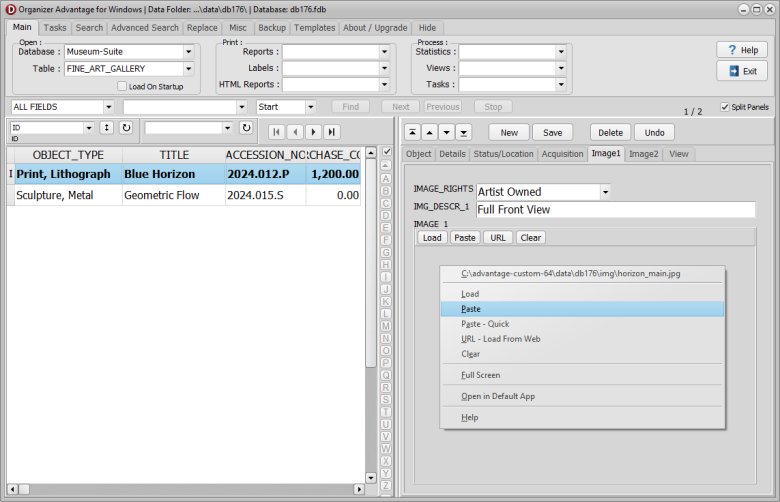
- You can enter the image of the object.
- Right-clicking the image field displays a pop-up menu with image commands.
- Read this help topic to find more.
Copyright © 2026 · All Rights Reserved · PrimaSoft PC