
Organizer Advantage is powerful yet easy to use database manager for Windows.
Advantage Designer lets you modify our solutions or easily create new databases.
Take control of your data with our simple or buinsess database software solutions.
| Organizer Advantage HowTo/Help | Designer HowTo/Help |
Advantage Help > HTML Reports > HTML Report Window
- Organizer Advantage
- Getting Started Videos
- Main Window
- Tabbed Toolbars
- Add Data
- No Limits
- Reports
- Labels
- Search, Replace
- HTML Reports
> HTML Report Window
- Edit, Create Template
- How To .. - HTML Wizard
- Import, Export
- Free Data Setup
- Backup, Restore
- Options
- Statistics, Views
- Solutions
- Templates
- Add-Ons
- Install, Network
- Web Search, Add Data
- Premium
- Upgrade, Update
- Organizer Deluxe, Pro Users
- More
HTML Report Window: Preview, Print, and Manage Templates
The HTML Report window is where you select a template, set the print range (one record, all records, or from the current record), preview the merged document, and access the template editor. You can also use Advanced Search or the Quick Filter to limit which records are included in the output.
In the Print Customized Documents window you can preview the selected document, select the print range, print the report, email the report, or design a new customized report.
Available HTML Templates (1): lists all predefined html templates.
Print/Display Mode (2): print/display one record, all records, or all from the currently selected record on the grid.
Preview (3): display the selected document with the data from the record(s).
Edit Template (4): provides tools that let you create or edit the template file.
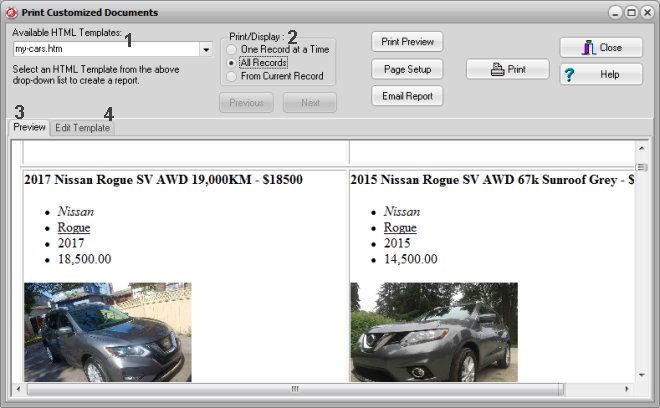
You can print one record, all records, or records from the currently selected record.
All Records: the HTML report will include all records displayed in the table. To limit the number of records in the report, define an advanced search or apply a previously defined advanced search (quick filter).
Copyright © 2026 · All Rights Reserved · PrimaSoft PC