
Organizer Advantage is powerful yet easy to use database manager for Windows.
Advantage Designer lets you modify our solutions or easily create new databases.
Take control of your data with our simple or buinsess database software solutions.
| Organizer Advantage HowTo/Help | Designer HowTo/Help |
Advantage Help > Templates > How to delete table?
easy-to-use database manager and database designer for Windows
- Organizer Advantage
- Getting Started Videos
- Main Window
- Tabbed Toolbars
- Add Data
- No Limits
- Reports
- Labels
- Search, Replace
- HTML Reports
- HTML Wizard
- Import, Export
- Free Data Setup
- Backup, Restore
- Options
- Statistics, Views
- Solutions
- Templates
- Commands
- Download Template
- Install Template
- Review Templates
- Copy Table
> Delete Table
- Delete Database
- How To .. - Add-Ons
- Install, Network
- Web Search, Add Data
- Premium
- Upgrade, Update
- Organizer Deluxe, Pro Users
- More
Delete Template Table
This page explains how to delete tables from database templates in Organizer Advantage for Windows.
Removing unused tables helps simplify database structures and improve organization.
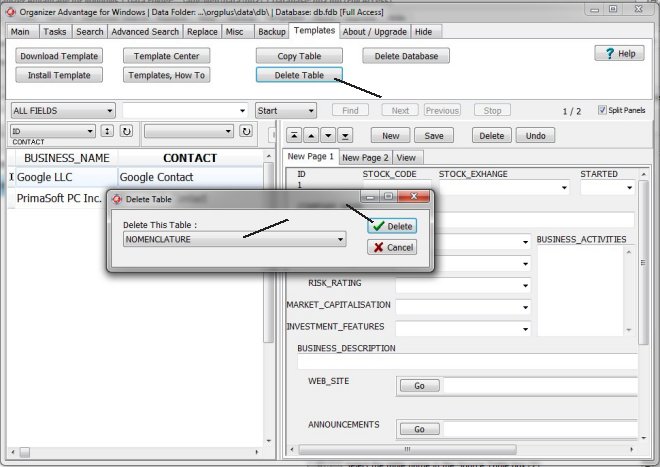
Delete Table
- Load the database (the delete table feature deletes the selected table from the currently opened database).
- On the Templates toolbar click Delete Table.
- Select the table name in the Delete This Table box.
- Click Delete.
- The selected table is deleted from the database.
Copyright © 2026 · All Rights Reserved · PrimaSoft PC