
Organizer Advantage is powerful yet easy to use database manager for Windows.
Advantage Designer lets you modify our solutions or easily create new databases.
Take control of your data with our simple or buinsess database software solutions.
| Organizer Advantage HowTo/Help | Designer HowTo/Help |
Advantage Help > Options > Color Styles
easy-to-use database manager and database designer for Windows
- Organizer Advantage
- Getting Started Videos
- Main Window
- Tabbed Toolbars
- Add Data
- No Limits
- Reports
- Labels
- Search, Replace
- HTML Reports
- HTML Wizard
- Import, Export
- Free Data Setup
- Backup, Restore
- Options
- User Interface
- User Interface 2
> Color Styles
- Maintenance
- Email Setup
- Company Info
- Custom Fields
- Multi-User, Login
- How To .. - Statistics, Views
- Solutions
- Templates
- Add-Ons
- Install, Network
- Web Search, Add Data
- Premium
- Upgrade, Update
- Organizer Deluxe, Pro Users
- More
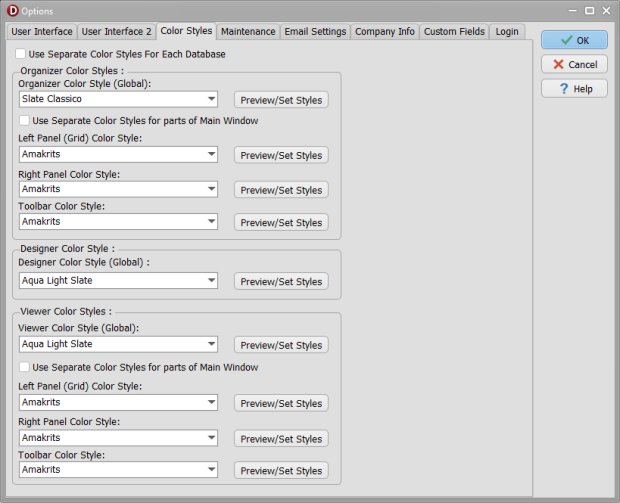
Color Styles: Select and Preview Themes for the Entire Application or Individual Modules
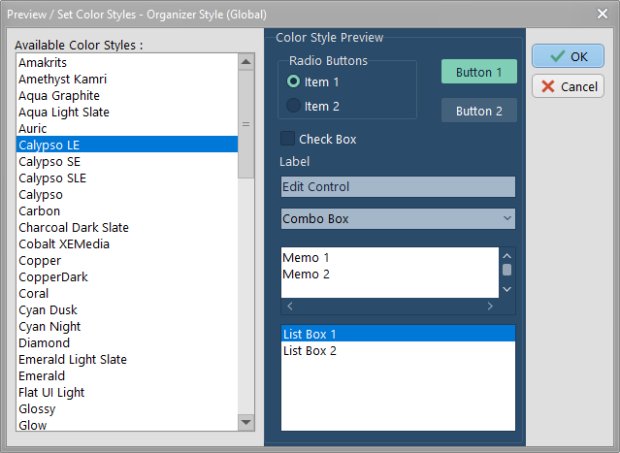
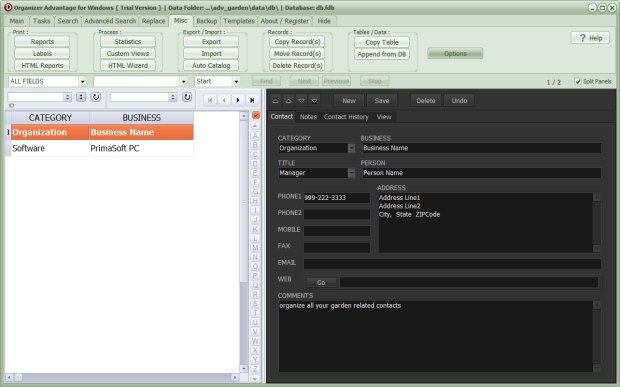
This section describes the Color Styles feature introduced in version 2.0. This feature enables users to apply a consistent color theme across the entire application or to customize different themes for specific windows and modules. It includes information about the Preview/Select window and provides an example of the main window showcasing a combination of styles.
Options, Color Styles
You can choose a new color style for the whole application or different ones for separate windows and application modules
Review and select a new style in the Preview/Select Color Styles window.
Organizer Advantage with different styles for parts of the main window.
Copyright © 2026 · All Rights Reserved · PrimaSoft PC