
Organizer Advantage is powerful yet easy to use database manager for Windows.
Advantage Designer lets you modify our solutions or easily create new databases.
Take control of your data with our simple or buinsess database software solutions.
| Organizer Advantage HowTo/Help | Designer HowTo/Help |
Advantage Help > Options > User Interface
easy-to-use database manager and database designer for Windows
- Organizer Advantage
- Getting Started Videos
- Main Window
- Tabbed Toolbars
- Add Data
- No Limits
- Reports
- Labels
- Search, Replace
- HTML Reports
- HTML Wizard
- Import, Export
- Free Data Setup
- Backup, Restore
- Options
> User Interface
- User Interface 2
- Color Styles
- Maintenance
- Email Setup
- Company Info
- Custom Fields
- Multi-User, Login
- How To .. - Statistics, Views
- Solutions
- Templates
- Add-Ons
- Install, Network
- Web Search, Add Data
- Premium
- Upgrade, Update
- Organizer Deluxe, Pro Users
- More
User Interface Settings: Layout, Skin, Toolbar, and Display Options
This section outlines all the User Interface controls with numbered references to their corresponding areas in the main window. It includes options for application skin/style, toolbar position, grid font size, navigation type, panel visibility, and auto-save mode. Additionally, it addresses the Jpeg Scale feature for faster display of large images.
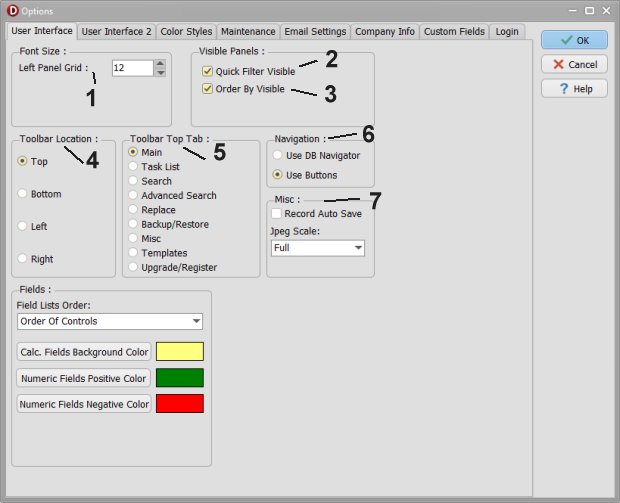
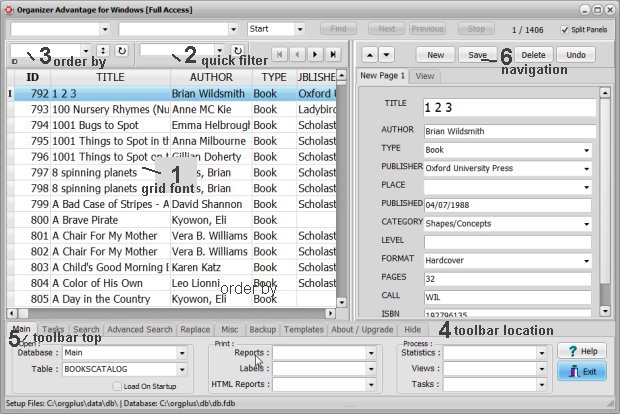
Miscellaneous (7):
- Record Auto Save mode: turn on the Record Auto Save. You don't have to click the Save button to save the new changes. The program does it for you automatically.
- Jpeg Scale: Set the scale mode to speed up the record's display with huge images.
You can review skin styles.
Copyright © 2026 · All Rights Reserved · PrimaSoft PC