
Help, how to topics > Custom Views > How to Find and Report Duplicate Books by ISBN
-
Views, Statistics
- save a view
- views assistant
- ready-to-use views
- times checked out
- copies per title
- never loaned out items
- loans by year, month
- cost of not returned items
- loans per borrower
- statistics total purchase cost
- overdue items report with call, location
- library SQL sample, join 3 tables
- overdue items by borrower type
- overdue item by student class
- loaned out items by book format
- yearly circulations by item type
- items added in the last year
- items not checked out in the last year
- loaned out items report with call number
> find and report duplicate books by ISBN
Troubleshooting & Reporting Duplicate Library Entries
Why Duplicate Entries Happen in Small Libraries
In small or volunteer-run libraries, duplicate records are very common. They usually happen due to the following situations:
- No Standard Rules: The library lacks strict guidelines on how to type in book titles or authors (e.g., entering "J.K. Rowling" vs. "Rowling, JK").
- Limited Training: Volunteers process books quickly without fully understanding how the database stores and searches for entries.
- Lack of Communication: Multiple people enter data during different shifts without checking what others have already cataloged.
- Varying Identifiers: Books are entered using the 10-digit ISBN by one volunteer and the 13-digit ISBN by another.
- Donation Piles: Large batches of donated books are entered hastily without first checking the existing shelves.
- Interrupted Work: A volunteer starts entering a book, gets distracted by a visitor, and later re-enters the same book.
Finding and Fixing Duplicates with Reports
When the situations above happen, your library database ends up with messy, duplicate records. Checking thousands of books by hand to find these errors is nearly impossible.
This topic explains how to easily create a report that identifies duplicate items in your main library collection (LIBRARY) and your temporary or new cataloging list (LIBRARY_NEW). It also shows you how to find books that already exist in your main collection but were accidentally typed into your new list again.
Important Note for Volunteers: This report searches for data entry errors where the same copy was accidentally saved twice. Please remember that having the same ISBN in your system is sometimes intended—such as when your library owns three physical copies of the same popular book. Use this report to look for accidental double entries, not your intentional extra copies!
You do not need to know how to write database code. Copy the computer queries provided below and paste them directly into your program's SQL query tool. Once the system finds the duplicates, you can export the results to a simple text file and open it in Microsoft Excel to safely review and clean up your data.
Explanation of "Duplicate Items in LIBRARY" Query
This query looks through your main collection database (LIBRARY).
It specifically scans and compares the exact numbers stored in the ISBN data field. It does not use the book title because titles can be typed with slight differences (such as missing a subtitle or a punctuation mark), which would cause the computer to miss the duplicate. If two records share the same ISBN, this query will flag them for your review.
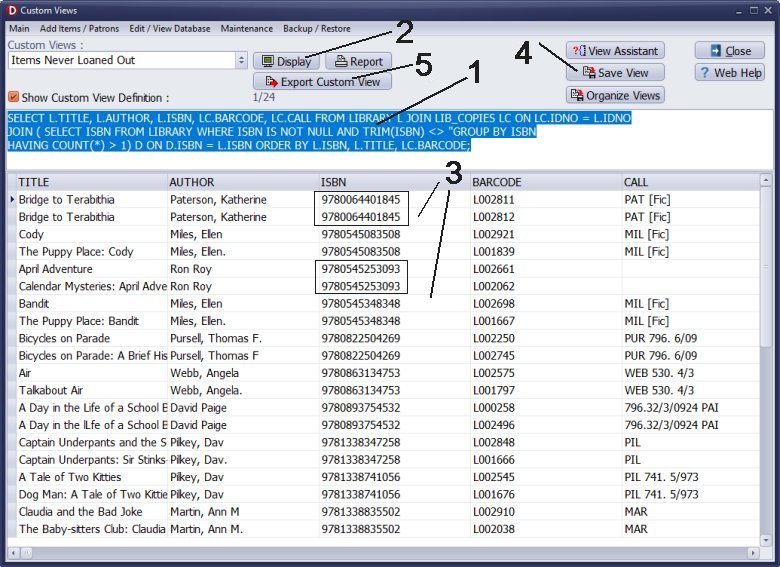
- Copy the text from the above box.
- Paste the text into the Custom Definition Box (1).
- Click Display (2) to execute the query and show the result (3).
- Click Save View(4) to save the view.
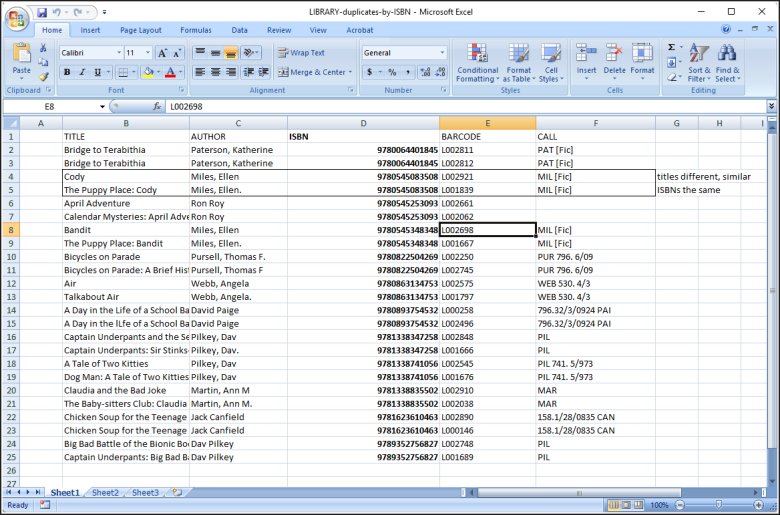
Once your query finishes running, follow these steps to save the results (as shown in the image):
- Click Export: Select the Export Custom View (5) button.
- Save the File: Choose Text Tab Delimited File as your file type.
- Select Columns: Check the boxes for the fields you want to save, making sure ISBN, Title, and Author are selected.
- Open in Excel: Launch Microsoft Excel, click Open, and select your saved text file to easily review and manage your duplicates.
Explanation of "Duplicate Items in LIBRARY_NEW" Query
This query checks your incoming book list (LIBRARY_NEW) before you finalize it.
It searches only for matching ISBN values that were typed in multiple times during your current cataloging session. Focusing strictly on the unique ISBN rather than on slightly different title names helps you safely catch and delete duplicate entries before they merge into your main collection.
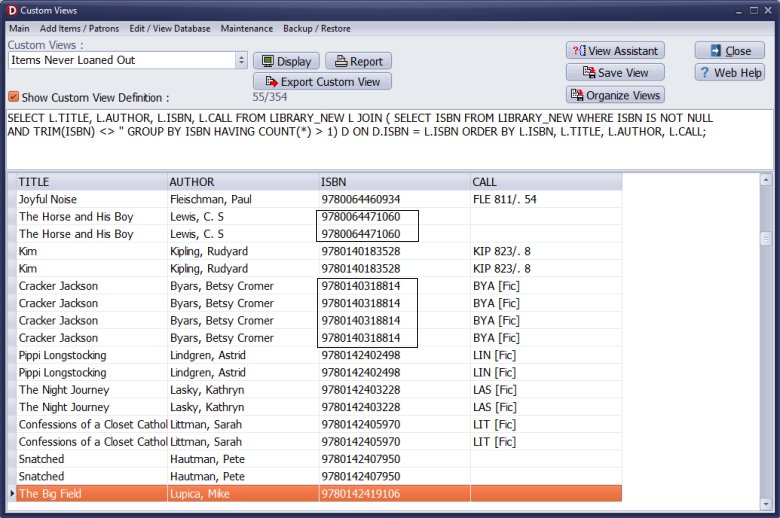
- Copy the text from the above box.
- Paste the text into the Custom Definition Box (1).
- Click Display (2) to execute the query and show the result (3).
- Click Save View to save the view.
Explanation of "Duplicates from LIBRARY in LIBRARY_NEW" Query
This query compares the ISBN values in your temporary list (LIBRARY_NEW) against
the ISBN values in your main catalog (LIBRARY). It acts as a safety shield by ignoring title spelling variations and looking only at the exact book numbers. It warns you if an ISBN on your new desk already matches an ISBN sitting on the permanent library shelves, stopping you from accidentally adding a book you already own.
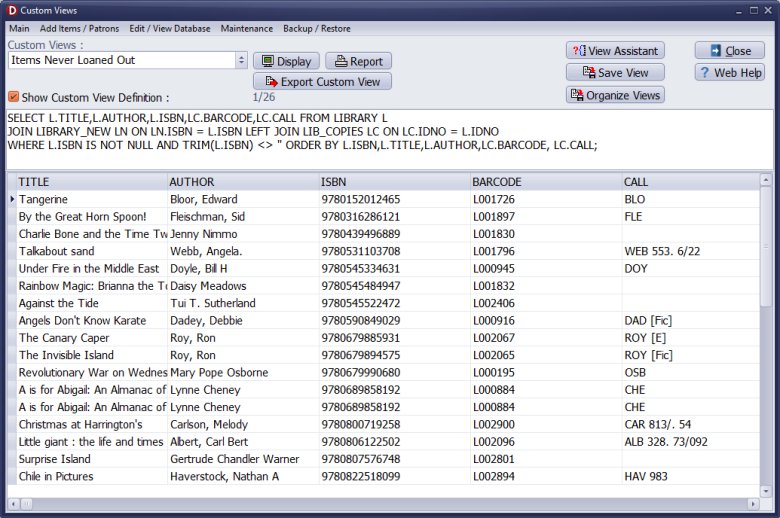
- Copy the text from the above box.
- Paste the text into the Custom Definition Box (1).
- Click Display (2) to execute the query and show the result (3).
- Click Save View to save the view.
Handy Library Manager 4.5, review new features
Inquiries from Librarians and Libraries
ISBN Book Finder And Cataloging Tool
Library Web Search, review new web search
How to print replacement labels?
Getting started library video lessons
How to include library name on labels
Library, Data Entry Form Designer
Edit item or borrower data in the check-in/check-out window?
Link item lost fine with the PRICE data field?
Handy v3.2 supports letter tabs?
How to predefine library email messages?
How to update library data from the web with ISBN?
How to predefine library email messages?
Compilation of questions and answers from library requests will help you to make purchase decision.
How to verify if the item is checked out in the library main catalog window?
How to create a new record using Copy Selected Item?
Special Library, how to manage digital and paper document library?
What is the maximum number of library items?
Library Software for Small Libraries, Windows application
Handy Library Manager
small library software
library tour
library features
try now, download
cloud
library software reviews
Copyright © 2026 · All Rights Reserved · PrimaSoft PC