
Help, how to topics > Custom Views > Create Library Loan Report with Call Number Data Field; SQL Guide.
-
Views, Statistics
- save a view
- views assistant
- ready-to-use views
- times checked out
- copies per title
- never loaned out items
- loans by year, month
- cost of not returned items
- loans per borrower
- statistics total purchase cost
- overdue items report with call, location
- library SQL sample, join 3 tables
- overdue items by borrower type
- overdue item by student class
- loaned out items by book format
- yearly circulations by item type
- items added in the last year
- items not checked out in the last year
> loaned out items report with call number
- find duplicate books by ISBN
Create Library Loan Report with Call Number Data Field / SQL Guide
Want to add a call number to the loans table. In the loans table, is it possible to add the call number field in addition to the title and bar code number to further define the library items that are out on loan. We would find it beneficial for verifying our inventory.
Explanation from user:
We do our inventory annually. Because select borrowers (church staff) are able to self check in/out we want
to verify that the books that are outstanding or overdue are actually out. We are currently sorting our inventory
lists by call number to go through our stacks sequentially. We currently do not include the bar code number
on the inventory list because of paper width constraints. So at the moment there is no easy way to reconcile the
books out/overdue to the inventory list except by accessing each book on the loan list and looking up its call number?
If the loan table is pulling in the book title and bar code number from the library catalog table,
shouldn't it also be able to pull the call number in as well?
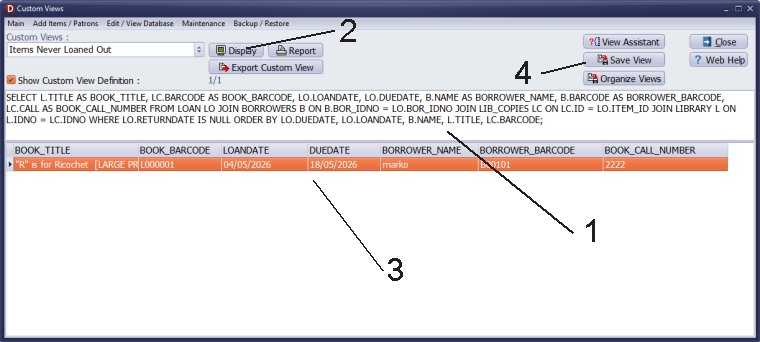
- Copy the text from the above box.
- Paste the text into the Custom Definition Box (1).
- Click Display (2) to execute the query and show the result (3).
- Click Save View to save the view.
If you want to update NOTES with the CALL number of the book, use this SQL statement:
UPDATE LOAN L SET L.NOTES = (SELECT C.CALL FROM LIB_COPIES C WHERE C.ID = L.ITEM_ID) WHERE L.ITEM_ID IS NOT NULL;
If you want to update EXTRA1 with the CALL number of the book, use this SQL statement:
UPDATE LOAN L SET L.EXTRA1 = (SELECT C.CALL FROM LIB_COPIES C WHERE C.ID = L.ITEM_ID) WHERE L.ITEM_ID IS NOT NULL;
Handy Library Manager 4.5, review new features
Inquiries from Librarians and Libraries
ISBN Book Finder And Cataloging Tool
Library Web Search, review new web search
How to print replacement labels?
Getting started library video lessons
How to include library name on labels
Library, Data Entry Form Designer
Edit item or borrower data in the check-in/check-out window?
Link item lost fine with the PRICE data field?
Handy v3.2 supports letter tabs?
How to predefine library email messages?
How to update library data from the web with ISBN?
How to predefine library email messages?
Compilation of questions and answers from library requests will help you to make purchase decision.
How to verify if the item is checked out in the library main catalog window?
How to create a new record using Copy Selected Item?
Special Library, how to manage digital and paper document library?
What is the maximum number of library items?
Library Software for Small Libraries, Windows application
Handy Library Manager
small library software
library tour
library features
try now, download
cloud
library software reviews
Copyright © 2026 · All Rights Reserved · PrimaSoft PC