
.. > Print Labels > Printing labels, how to select paper size?> Creating Custom Spine Labels for A4 page
-
Print Labels
- barcode labels
- print new items only
- print recently added
- spine labels
- design spine label
- spine labels, samples
- print one spine label
- randomly select, print
- index/catalog card
- print from current
- define custom label
- print markers
- print to PDF
- set alignment, PDF files
- new label temlates
- page sizes, A4, Legal
> custom spine label (A4)
- labels cross referernce
- spine labels, landscape
- library logo on labels
- design member id card, tag
- label suppliers
- spine labels, ready-to-use
- barcode labels, PDF files
- pre-print barcode labels
Creating Custom Spine Labels for A4 page: A Step-by-Step Guide
We offer several predefined label templates for A4 paper sheets that you can review. You might find one suitable for your needs. If the template you want to use isn't listed, you can easily create a new one, save it, and use it regularly.
For example, one user asked: "I am trying to set up spine labels for books on A4 paper with 8x12 labels. The units are in cm. The specifications are as follows: A4 paper with 8x12 labels, header height 1.2 cm, left margin 1 cm, label size 2.4 cm x 1.8 cm, and space between labels is 0.4 cm. Currently, my setup is producing a single label."
Please review the image below for step-by-step instructions on defining a new label template using A4 paper size and cm as the unit of measurement.
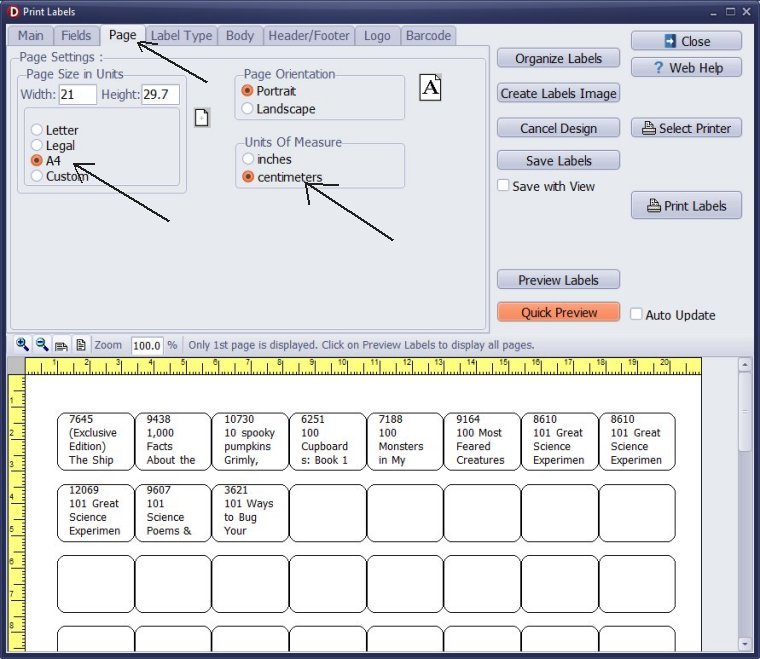
In the Page section, select the desired page size and the units of measurement.
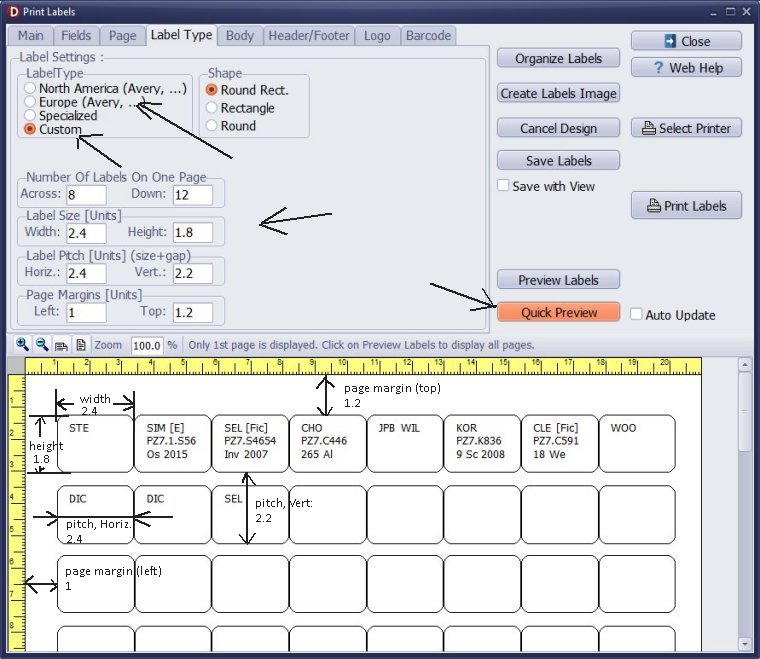
Verify if the label you plan to use is listed in the Europe section. If not, in the Label Type section, click "Custom" and enter your label measurements. After entering your measurements, click "Quick Preview" again to check the layout.
The horizontal pitch equals the label width, as there is no horizontal gap between labels.
Number of labels
Across:8 Down:12
Label Size
Width:2.4 Height:1.8
Label Pitch (label size + gap)
Horiz.:2.4 Vert.:2.2
Page Margins
Left:1 Top:1.2
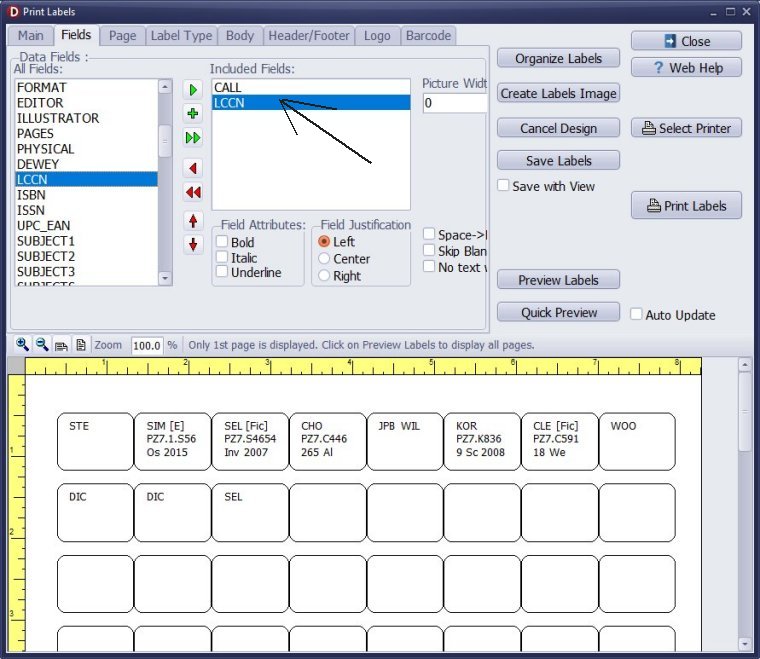
In the Fields section, choose the data fields that will appear on the spine labels. In this example, the CALL and LCCN data fields have been selected.
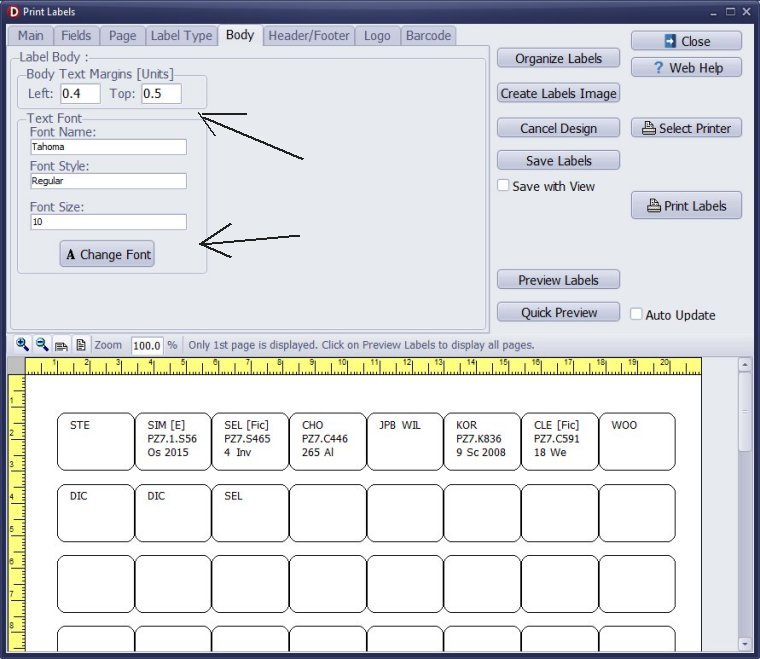
In the Body section, set the margins, text font type, and size. Click "Quick Preview" to verify your settings.
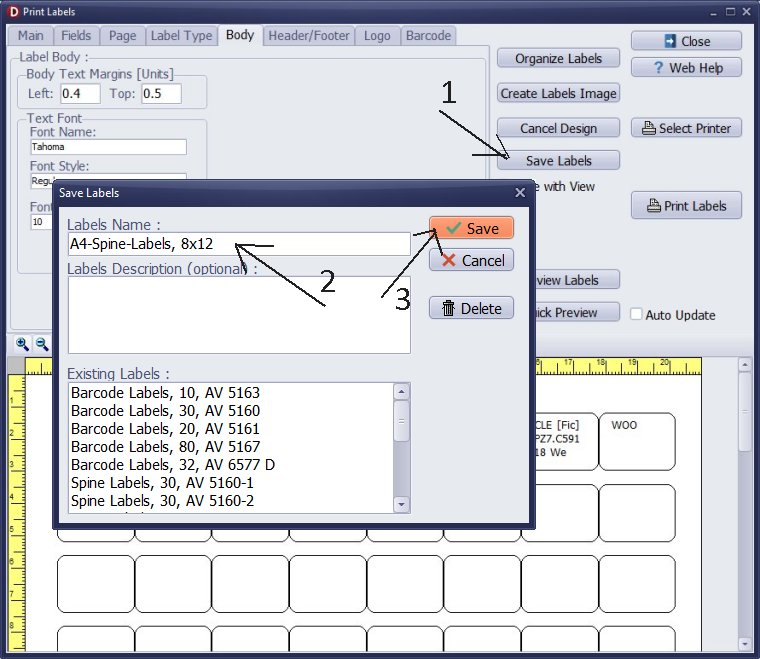
Once you are satisfied with all the settings, click "Save Labels" to save your template for future use. This way, you won't have to redefine the label again.
Question:
How to choose the right sheet size for my labels in Australia?
Handy Library Manager 4.5, review new features
Inquiries from Librarians and Libraries
ISBN Book Finder And Cataloging Tool
Library Web Search, review new web search
How to print replacement labels?
Getting started library video lessons
How to include library name on labels
Library, Data Entry Form Designer
Edit item or borrower data in the check-in/check-out window?
Link item lost fine with the PRICE data field?
Handy v3.2 supports letter tabs?
How to predefine library email messages?
How to update library data from the web with ISBN?
How to predefine library email messages?
Compilation of questions and answers from library requests will help you to make purchase decision.
How to verify if the item is checked out in the library main catalog window?
How to create a new record using Copy Selected Item?
Special Library, how to manage digital and paper document library?
What is the maximum number of library items?
Library Software for Small Libraries, Windows application
Handy Library Manager
small library software
library tour
library features
try now, download
cloud
library software reviews
Copyright © 2026 · All Rights Reserved · PrimaSoft PC